Skip to content
  • There are no suggestions because the search field is empty.

Rule Syntax

Rule SyntaxRule Syntax

This section describes the different rule syntax supported in the Reporting Engine.

NWDB Rule SyntaxNWDB Rule Syntax

The NWDB rule is one of the rule syntax supported in the Reporting Engine. To enhance the execution time of your reporting entities, see "Reporting Guidelines" section in Reporting Overview.

A Rule is a function that manipulates the result set of a rule in order to make the output in a report more meaningful or add additional functionality to a rule other than querying data and displaying it. Any combination of these rule actions can be used to create unique and interesting representations of the information collected by NetWitness.

The Reporting Engine supports the following categories of NWDB data source rule syntax:

  • select clause

    • Non-Aggregate Rule
    • Aggregate Rule
  • alias
  • where clause
  • where clause Operators
  • then clause
  • Limit field
  • Rule Actions
  • Rule Operators

Select Clause

The select clause is a comma separated list of values. For example: select sessionid,time,service.

​There are two types of select clause for NWDB Rule:

  • Non-aggregate rule
  • Aggregate rule

Non-Aggregate Rule

When you want to define a rule without any grouping, choose 'None' in the Summarize field. In a non-aggregate rule, you can select any number of metas in the Select clause. For example, select service, sessionid, time.
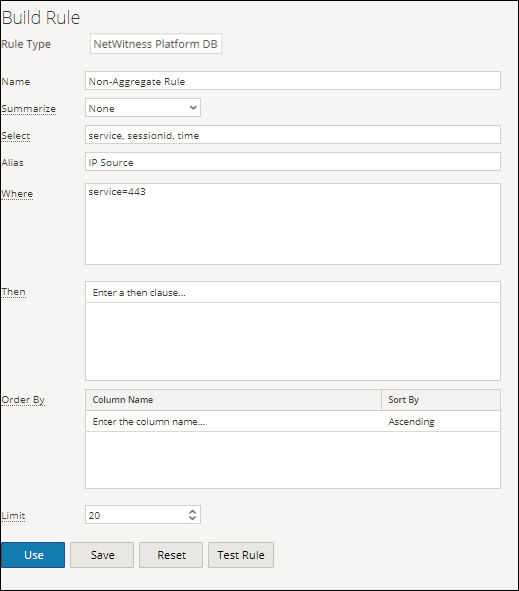
netwitness_110_non_aggregate_fn.png

Aggregate Rule

When you want to query for a specific meta and its associated aggregate value then you must use the Aggregate rule. To get an aggregate, you must choose either of the three metas (Event Count, Packet Count, Session Size) or choose 'Custom' in the Summarize field to include an aggregate function in the Select clause. For example, select ip.src, sum (ip.dst). When Custom aggregate rule is enabled, the following fields are populated in the user interface:

  • Group By
  • Order By
  • Session Threshold

The following figure shows the Build Rule view for Aggregate Rule.
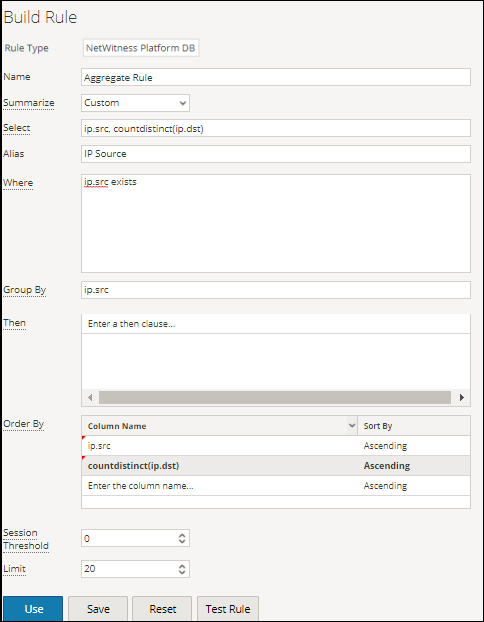
netwitness_110_agr_rule.png

There are two types of aggregate values that can be queried:

  • Collection aggregation
  • Meta aggregation

Collection Aggregation

With collection aggregation, you can get aggregates related to Event, Session or Packets. The following values can be queried in a collection aggregation:

  • Event Count: The total count of events.
  • Packet Count: The total count of packets.
  • Session Size: The total session size.

These options are listed in 'Summarize' field and any one of them can be selected in a rule.
For example, choose any of the Collection aggregates (Event Count or Packet Count or Session Size) in the 'Summarize' field and select ip.src.
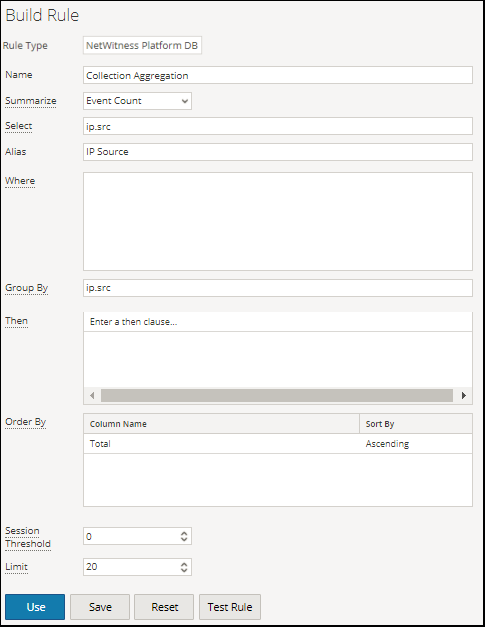
netwitness_110_agg_fn_event_count.png

Meta aggregation

With meta aggregation, you can get aggregates of meta values. The following are the supported meta aggregate functions:

  • sum(meta)
  • count(meta)
  • countdistinct(meta)
  • min(meta)
  • max(meta)
  • avg(meta)
  • first(meta)
  • last(meta)
  • len(meta)
  • distinct(meta)

Supported Meta Aggregate Functions

The NWDB service supports the following meta aggregate functions and syntax in this release.

  • Syntax: sum( )
  • Function:

    The sum of all meta values.

    For example, if you provide the field sum(payload) in the select clause, the resultset is the sum of payload size.

    Note: The meta field chosen for the sum aggregate function must be of numeric data type.


  • Syntax: count( )
  • Function:

    The total number of meta fields that would be returned.

    For example, if you provide the field count(ip.dst) in the select clause, the resultset is the number of times an ip.dst value is returned.


  • Syntax: countdistinct( )
  • Function:

    The total number of distinct meta fields that would be returned. For example, if you provide the field countdistinct(ip.dst) in the select clause, the resultset is the number of times a distinct ip.dst value is returned.


  • Syntax: min( )
  • Function:

    The minimum of all meta values.

    For example, if you provide the field min(payload) in the select clause, the resultset is the min of payload size.


  • Syntax: max( )
  • Function:

    The maximum of all meta values.

    For example, if you provide the field max(payload) in the select clause, the resultset is the max of payload size.


  • Syntax: avg( )
  • Function:

    The average of all meta values.

    For example, if you provide the field avg(payload) in the select clause, the resultset is the avg of payload size.

    Note: The meta field chosen for the avg aggregate function must be of numeric data type.


  • Syntax: first( )
  • Function:

    The first occurrence of the meta value.

    For example, if you provide the field first(ip.src) in the select clause, the resultset is the first occurrence of ip.src for that group.


  • Syntax: last( )
  • Function:

    The last occurrence of the meta value.

    For example, if you provide the field last(ip.src) in the select clause, the resultset is the last occurrence of ip.src for that group.


  • Syntax: len( )
  • Function:

    Converts all field values to a UInt32 length instead of returning the actual value. This length is the number of bytes to store the actual value, not the length of the structure stored in the meta database.

    For instance, the meta value "NetWitness" returns a length of 10. All IPv4 fields, like ip.src, returns 4 bytes.


  • Syntax: distinct( )
  • Function:

    The distinct values of the meta.

    For example, if you provide the field distinct(ip.src) in the select clause, the resultset is all the distinct ip.src for that group.


You must select 'Custom' in 'Summarize' field and provide the meta and the meta aggregate functions in the select clause.
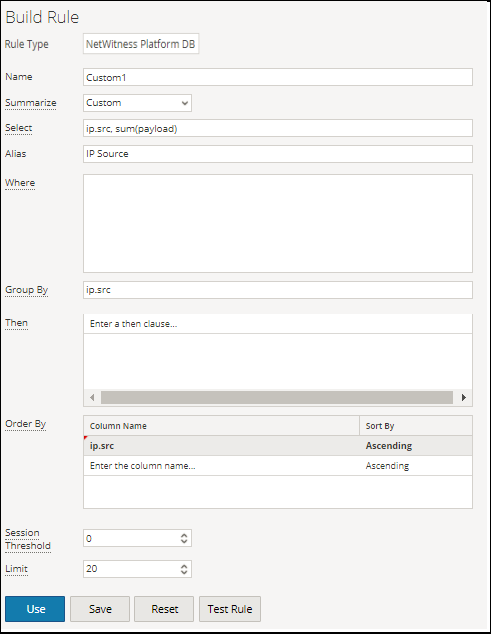
netwitness_110_agg_fn_custom.png

Note: Meta aggregate functions cannot be used in a WHERE clause and the rule actions like min_threshold/max_threshold can be used to filter aggregate functions. It is advised to use a more refined WHERE clause to get a better rule performance while using 'group by'.

Aggregate Query for Multiple Meta

To execute aggregate query for multiple Meta, follow these steps:

  1. Go to Reports.

    The Manage tab is highlighted and the Rules view is displayed.

  2. In the Rules toolbar, click netwitness_110_add_button.png > NetWitness Platform DB.

    For example, enter the following meta in the fields highlighted below:

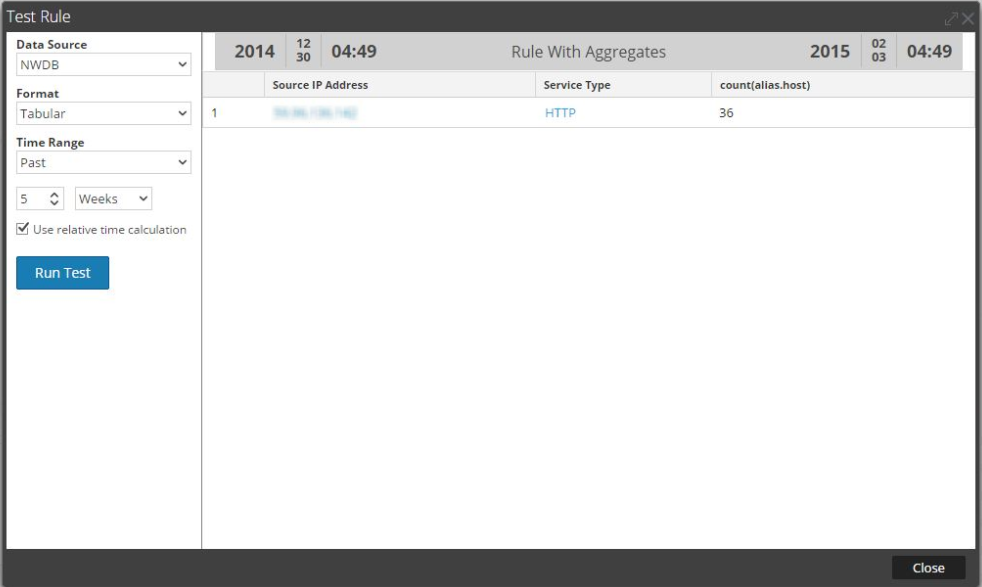
    SELECT: ip.src, service, count(alias.host)
    ALIAS: Source IP Address, Service Type, count(alias.host)
    WHERE: ip.src = 59.96.136.142

    Note: In the alias field you can enter a name for columns used in the select clause. If you do not specify the alias for one of the field in the select clause, then the default description will be used. For example, if the select clause has Field1, Field2, Field3, Field4, and alias has only Field1, Field3, Field4, then for Field2 a default description is used.

  3. Click the Test Rule button at the bottom of the screen.

    The Test Rule page is displayed.
    netwitness_110_multiple_qry_meta.png

Summarize

Summarize determines the type of summarization or aggregation for the rule.

  • Name: Summarize
  • Config Value:

    To query metas without any custom grouping, select:

    • None: The data is grouped by session in this case.

    To get collection (sessions/events/packets) related aggregates, select either of the following:

    • EventCount: The total count of events.
    • Packet Count: The total count of packets.
    • Session size: The total session size.

    To get meta based aggregates, select:

    • Custom: This indicates that expected meta aggregate function is defined in rule select clause.

Order By

Order By determines how to sort the result set.

  • Name: Column Name
  • Configuration Value: The Column Name is the name of the columns by which you want to sort the results. By default, the value is empty. When you click on a column, the value gets populated based on the Summarize field.
    • For 'None' and 'Custom', the value gets populated based on the entries made in the Select field. You can select from this list or add custom name.
    • For Event Count, Packet Count and Session size, accepted values are Total and Value.
    • Total - sort by aggregate value
    • Value - sort by group by meta

  • Name: Sort By
  • Configuration Value: Sort By determines the order in which you want to sort the results. The following are the values:
    • Ascending Order
    • Descending Order

Session Threshold

The session threshold is the optimization setting to stop scanning the matching sessions for each possible
unique value for the selected meta. The threshold is an integer between 0 (default) and 2147483647. The threshold 0 scans for all matching sessions.

Note: If you provide a non-zero value (a value higher than zero), the aggregate results are inaccurate. This can be used only when you are interested in unique values and not aggregate values.

Supported where Clause

  • Syntax: where [ ] <value1>, , ,and so on
  • Description: The where clause is a comma separated list of language field values and ranges that is used by NwValues function. In the where clause, string values have to be enclosed within single quotes. For example, where username = 'admin' && service = 22.

  • Syntax: where [ ]
  • Description: You can use a list in the where clause if you have multiple values to report on. For example, where ip.src exists && alias.host exists && alias.host contains $[User Reports/List of Alias Host]. When you use the list you must specify in the format $[ / ].

In the where clause, make sure the syntax is correct based on the meta type.
For example,
For all text meta type use quotes for example, username = ‘user1’.
For all IP Addresses, Ethernet Addresses, and Numeric meta types do not use quotes for example, service = 80 && ip.src = 192.168.1.1.
For date and time meta types, if the date and time format is 'YYYY-MM-DD HH:MM:SS‘, use quotes.
If the date and time format is 1448034064 (number of seconds since EPOCH (Jan 1, 1970)), do no use quotes.

Note: If list is used in the rule, make sure that the list values are quoted or unquoted based on the type of the meta used. Checking the Quotes will be inserted for all the values checkbox in list definition page (for more information see, "Create Lists or List Groups" section in Configure a Rule) would quote all the list values. ​

Supported where Clause Operators

  • Syntax: =
  • Description: Returns results where the field is equal to any provided value. For example, tcp.dstport = 21-25,110 returns session with TCP destination ports of 21, 22, 23, 24, 25, or 110.

  • Syntax: !=
  • Description: Returns results for fields that do not match the values specified. For example, eth.type !=0x0800 returns sessions outside of hex value (decimal value of 2048) that is all non-IP based protocols.

  • Syntax: begins
  • Description: Checks for a value at the beginning of a text or binary field.

  • Syntax: contains
  • Description: Searches a text or binary value for a partial match.

  • Syntax: ends
  • Description: Checks for a value at the end of a text or binary field.

  • Syntax: exists
  • Description: If the field value exists, regardless of value, the operation evaluates to true.

  • Syntax: !exists
  • Description: If the field value does not exist, the operation evaluates to true.

  • Syntax: length
  • Description: Evaluates the length of the field. For example, username length 20-u returns any username that is 20 or more characters long.

  • Syntax: regex
  • Description: Performs a regular expression search against text or binary values.

  • Syntax: not
  • Description: Not operator is used to negate a clause or condition. For example, (not(user.dst ends "$")) will not display values for user destination.

Supported then Clause

  • Syntax:

    then

  • Description:

    The then clause contains a rule action that manipulates the original result set of a rule in order to make the output in a report more concrete or add additional functionality other than querying data and displaying it. For example, dedup (filename).


Limit field

This indicates the limit to be put on the query while fetching data from the database. If a result set is sorted by event
count, packet count, or session size, the limit represents the top (or bottom) N values to be returned. If the result set is not
sorted, the first N values are returned.

Rule Actions

The NWDB data source rule syntax supports the following rule actions:

  • dedup
  • filter_on
  • filter_out
  • lookup_and_add
  • max_threshold
  • min_threshold
  • regex
  • sum_count
  • sum_values
  • show_whats_new

dedup (string field)

dedup removes the duplicate entries in an unsorted result set and displays only pertinent data. The dedup rule action removes duplicate entries of a specific field in the report, so that only the first occurrence of that value is listed in the report.

Note: The dedup rule action cannot be used with an aggregate rule.

For example, the meta data generated by an individual session is often repetitive, especially when you have sessions with a lot of DNS lookups or web sessions that access the same host multiple times for various resources (such as, javascript, css). To remove the duplicate entries of the host, you can use the dedup rule action.

Example:

The following example is a lengthy result set that can be trimmed by removing the duplicate values in the same session.
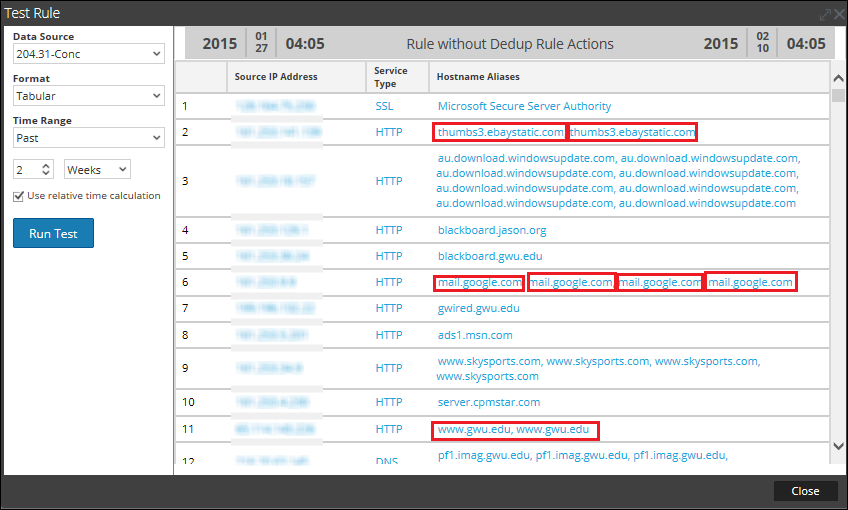
netwitness_110_dedup_before.png

The following figure shows the use of dedup rule action to remove the duplicate entries from the result set.
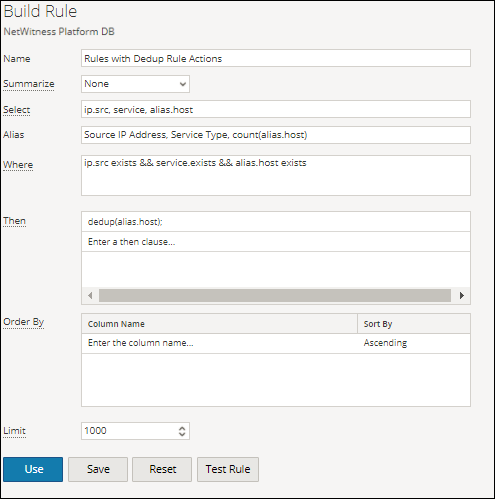
netwitness_110_dedup_build.png

The duplicate value for each entry in the rule result set is reduced to one value.
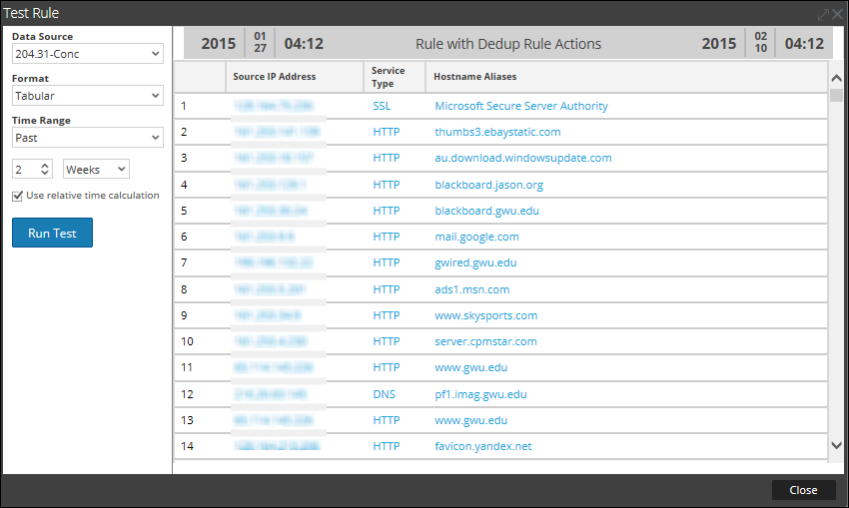
netwitness_110_dedup_after_849x508.png

filter_on (string filter, string field, bool matchExact)

filter_on removes values that do not contain the filter criteria from the result set. If the result set contains multiple fields, you must select a specific field to which the filter is applied. To add additional results to a single result set, include function such as lookup_and_add.

The matchExact parameter determines if the match is an exact match or contains a match.

  • If matchExact is set to false, any value that contains the filter text is considered a match.
  • If matchExact is set to true, only values that match the provided filter text is included in the result set.

Note: Unless the matchExact parameter is specified, the default behavior of the rule action is to match exactly the text specified in the filter parameter. To specify that results containing the filter text must be kept in the result set, users must set the matchExact parameter to false.

Example:

The following figure displays the list of countries and their event count.
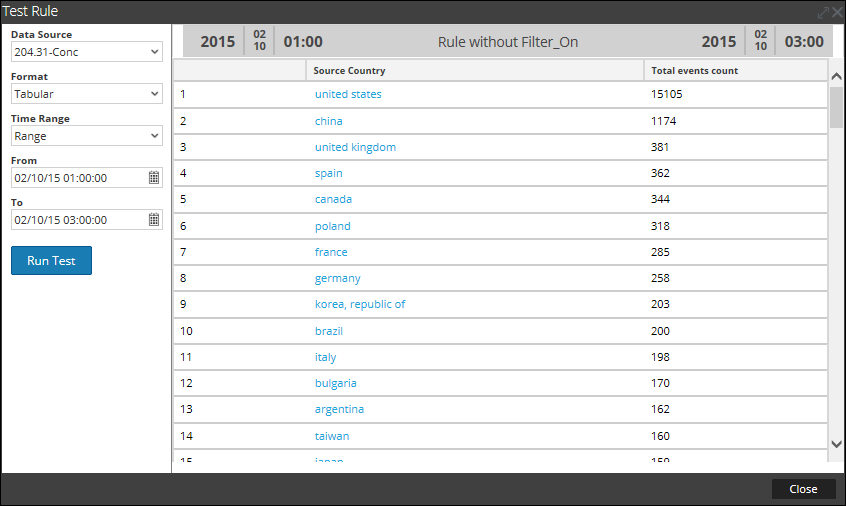
netwitness_110_before_filteron_result.png

The following figure shows a filter_on rule action to filter out countries except Spain, China, United States and United Kingdom from the result set.
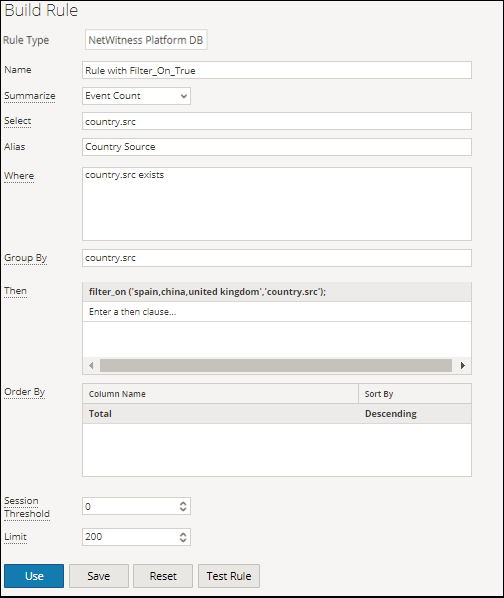
netwitness_110_with_filteron_build_rule.png

The following figure shows the output with the filter_on rule action.
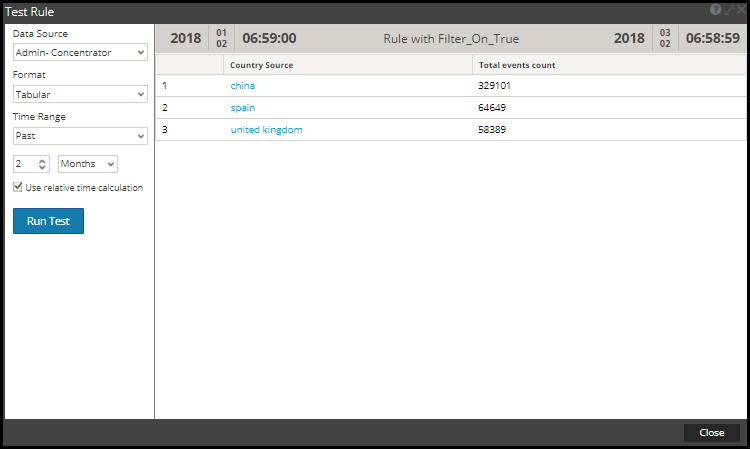
netwitness_110_with_filteron_result.png

Another way of filtering out the entries from the result set is to create a list of variables which you want to filter out. For example, you can create a list with United Kingdom, France and Germany as values in the list. You can use this list in the rule action to get the same result set. For example, if you create a list called COUNTRY_LIST, you can use the list as follows:

filter_on ('$COUNTRY_LIST', 'country.src', 'false');

filter_out (string filter, string field)

filter_out (string filter, string field, bool matchExact)

filter_out removes the values that contain the filter criteria from the result set. If the result set contains multiple fields, you must select a specific field to which the filter is applied (for example, you can use a lookup_and_add to add results to a single result set).

The matchExact parameter determines if the match is an exact match or contains a match.

  • If matchExact is set to false, any value that contains the filter text is considered a match.
  • If matchExact is set to true, only values that match the provided filter text is excluded from the result set.

Note: Unless the matchExact parameter is specified, the default behavior of the rule action is to match exactly the text specified in the filter parameter. To specify that results containing the filter text must be removed from the result set, users must set the matchExact parameter to false.

Example:

The following figure displays the list of countries and their event count.

netwitness_110_before_filter

,,,,,, ,,,,,,, ,,,,,,, ,,,,,,, ,,,,,,, ,,,,,,, ,,,,,,, ,,,,,,, string field),,,,,,, ,,,,,,, string field, int limit),,,,,, ,,,,,,, string field, int limit, boolean inherit),,,,, ,,,,,,, string field, int limit, boolean inherit, string extraWhere) ,,,, ,,,,,,, string field, int limit, boolean inherit, string extraWhere, boolean aggregate),,, ,,,,,,, ,,,,,,, ,,,,,,, select, designates the type of meta data that must be added to elements of the result set. The second parameter, field, specifies where in the result set the append must apply to. Also, a limit can be applied to avoid crowding the result set with a large result set.,,, subsequent queries to the SDK will inherit the where clause of the parent rule. To use a unique where clause, you can specify a boolean value in the fourth parameter as false and in the fifth parameter you can specify a different where clause.,,,,,, make sure that you use a single quote (') for enclosing arguments and double quotes (") for string values.,,,,,,, with the addition of Custom summarization and Group By feature, the result can be achieved even without having lookup_and_add rule action. The new rule syntax with groupby displays the result in a flat structure which is better than the earlier rule syntax without groupby Hence it is recommended to manually edit/update rules with lookup_and_add rule action and use groupby clause wherever it is applicable.,,,,,, ,,,,,,, see below scenarios: In Example 2a, lookup_and_add rule action is used. Instead of using lookup_and_add rule action, the same result can be achieved by using Custom summarization and Group By feature. See Example 2b below.,,,,, lookup_and_add rule action is still supported for NWDB rules on the following conditions:,,,,,,, Packet Count, or Session Size.
  • For Custom summarization, the lookup_and_add rule must have only one group by meta with only one aggregate function where the aggregate function must be either sum() or count().
  • ,,,,, ,,,,,,, lookup_and_add rule action can be used for the following rules:,,,,,,, sum(size) group by ip.src
  • select ip.src, count(filename) group by ip.src
  • ,,,,,, ,,,,,,, sum(size),count(filename) group by ip.src
  • select ip.src, sum(size),avg(size) group by ip.src
  • select ip.src,ip.dst count(filename) group by ip.src,ip.dst
  • ,, ,,,,,,, ,,,,,,, 'ip.src', 2);,,,,,, ,,,,,,, ,,,,,,, ,,,,,,, ,,,,,,, ,,,,,,, ,,,,,,, ,,,,,,, ,,,,,,, ,,,,,,, ,,,,,,, 'ip.src', 2); lookup_and_add('service','ip.src', 3);,,,, ,,,,,,, ,,,,,,, ,,,,,,, ,,,,,,, ,,,,,,, ,,,,,,, ,,,,,,, ,,,,,,, ,,,,,,, ,,,,,,, you may want to know what files each source IP had touched. However, because the parent rule has a WHERE clause of service = 6667 and the default behavior of this rule action is to append to the original WHERE clause, it becomes necessary to override the parent WHERE clause. The easiest way to understand this concept is to look at the previous lookup_and_add call lookup_and_add('ip.dst','ip.src',2). The actual query that is sent to the server is SELECT ip.dst WHERE service = 6667 &&ip.src = 206.42.199.194. In order to force the WHERE clause to override the service = 6667 portion of the WHERE clause (inherited from the parent rule), the user can specify a 4th parameter of false as shown in example 3.,, ,,,,,,, ,,,,,,, ,,,,,,, ,,,,,,, ,,,,,,, ,,,,,,, ,,,,,,, ,,,,,,, ,,,,,,, ,,,,,,, ,,,,,,, 'ip.src',2, false);,,,,, ,,,,,,, like SELECT filename WHERE ip.src = 90.0.0.142 rather than SELECT filename WHERE service = 6667' && ip.src = 90.0.0.142 because you have specified the rule action to ignore the initial WHERE clause of the parent rule.,,,,,,, ,,,,,,, ,,,,,,, ,,,,,,, ,,,,,,, ,,,,,,, ,,,,,,, ,,,,,,, ,,,,,,, you can access that list with the following syntax.,,,,,,, ,,,,,,, 'ip.src',5, false, 'filename CONTAINS $[DocTeamList/test]');,,,, ,,,,,,, ,,,,,,, ,,,,,,, ,,,,,,, ,,,,,,, ,,,,,,, ,,,,,,, ,,,,,,, ,,,,,,, 'ip.src',2,TRUE,,false);,,, ,,,,,,, this implies that aggregates would be skipped for lookup values and hence the lookup query executions will complete faster.,,,,,,, ,,,,,,, Reporting Engine passes threshold=1, Sort by='value' and Order=Ascending to NWDB to make lookup queries run faster.
    . You must set the 'aggregate' to false, when rule contains aggregate functions or when the rule is run against a wide time range. This helps the rule to complete the execution faster.,,,,, ,,,,,,, ,,,,,,, ,,,,,,, ,,,,,,, ,,,,,,, ,,,,,,, ,,,,,,, ,,,,,,, ,,,,,,, ,,,,,,, string field),,,,,,, ,,,,,,, the rule action expects you to specify the parameter in bytes (you can append KB, MB, GB, TB to the parameter to make size conversion easier). ,,,, ,,,,,,, Packet Count, and Session Size.
  • max_threshold(String quantity, String field): Can be used to filter values of Custom aggregates or any metas.
  • ,,,,, ,,,,,,, ,,,,,,, ,,,,,,, ,,,,,,, ,,,,,,, ,,,,,,, ,,,,,,, ,,,,,,, ,,,,,,, ,,,,,,, ,,,,,,, ,,,,,,, ,,,,,,, ,,,,,,, ,,,,,,, ,,,,,,, count(alias.host));,,,,,,, ,,,,,,, ,,,,,,, ,,,,,,, ,,,,,,, ,,,,,,, ,,,,,,, ,,,,,,, ,,,,,,, ,,,,,,, ,,,,,,, ,,,,,,, ,,,,,,, ,,,,,,, ,,,,,,, the rule action expects you to specify the parameter in bytes (you can append KB, MB, GB, TB to the parameter to make size conversion easier).,,,, ,,,,,,, Packet Count, and Session Size.
  • min_threshold(String quantity, String field): Can be used to filter values of Custom aggregates or any metas.
  • ,,,,, ,,,,,,, ,,,,,,, ,,,,,,, ,,,,,,, ,,,,,,, ,,,,,,, ,,,,,,, ,,,,,,, ,,,,,,, ,,,,,,, ,,,,,,, ,,,,,,, all the values are greater than 200 bytes.,,,,,,, count(alias.host));,,,,,,, ,,,,,,, ,,,,,,, ,,,,,,, ,,,,,,, ,,,,,,, ,,,,,,, ,,,,,,, ,,,,,,, ,,,,,,, ,,,,,,, ,,,,,,, ,,,,,,, string field),,,,,,, ,,,,,,, meta_name),,,,,,, ,,,,,,, ,,,,,,, refer to http://docs.oracle.com/javase/7/docs/api/java/util/regex/Pattern.html.,,,,,,, ,,,,,,, ,,,,,,, you can write a rule with the following regex rule action:,,,,,,, filename);,,,,,,, ,,,,,,, ,,,,,,, ,,,,,,, ,,,,,,, ,,,,,,, ,,,,,,, ,,,,,,, ,,,,,,, ,,,,,,, ,,,,,,, calling a sum_count() for a rule that is sorted by event count totals the size of all values in the result set and displays the total in place of the result set.,,,,,,, ,,,,,,, ,,,,,,, ,,,,,,, ,,,,,,, ,,,,,,, ,,,,,,, the output shows the total size of all the event counts.,,,,,,, ,,,,,,, ,,,,,,, ,,,,,,, ,,,,,,, ,,,,,,, ,,,,,,, ,,,,,,, ,,,,,,, ,,,,,,, ,,,,,,, ,,,,,,, ,,,,,,, ,,,,,,, ,,,,,,, ,,,,,,, ,,,,,,, ,,,,,,, NetWitness determines the ID of the first session in the time range of the report. If a value in a result set has a first session id that is greater than the first session id of the report time frame, it did not exist in the NetWitness meta database prior to the report being run and so is new to the NetWitness system relative to the time frame of the report.,,,,,, the first meta is considered for filtering out the old values. See "Example 2" below to understand how this rule action is used for Custom Aggregate Rule.,,,,,,, ,,,,,,, ,,,,,,, ,,,,,,, ,,,,,,, ,,,,,,, all the Source IP Addresses available for the past two weeks are listed.,,,,,,, ,,,,,,, ,,,,,,, ,,,,,,, ,,,,,,, ,,,,,,, ,,,,,,, ,,,,,,, ,,,,,,, ,,,,,,, ,,,,,,, ,,,,,,, ,,,,,,, ,,,,,,, all the Source IP Addresses available for the past two weeks are listed.,,,,,,, ,,,,,,, ,,,,,,, ,,,,,,, ,,,,,,, ,,,,,,, ,,,,,,, ,,,,,,, ,,,,,,, ,,,,,,, ,,,,,,, ,,,,,,, you will lose your data. However, it is easy to baseline a system and identify changes and new items without a tremendous amount of strain on the system (depending on the size of your result set).,,,,,, ,,,,,,, ,,,,,,, ,,,,,,, ,,,,,,, ,,,,,,, ,,,,,,, ,,,,,,, ,,,,,,, ,,,,,,, ,,,,,,, ,,,,,,, ,,,,,,, ,,,,,,, tcp.port = 40000-u selects all TCP ports above 40000.,,,,,,, ,,,,,,, tcp.port = l-40000 selects all TCP ports below 40000.,,,,,,, ,,,,,,, tcp.port = 25-443 selects all TCP ports between 25 and 443.,,,,,,, ,,,,,,, ,,,,,,, ,,,,,,, ,,,,,,, ,,,,,,, ,,,,,,, ,,,,,,, ,,,,,,, ,,,,,,, ,,,,,,, ,,,,,,, ,,,,,,, alert.name, count(*). ,,,,,, ,,,,,,, ,,,,,,, ,,,,,,, choose 'None' in the Summarize field. In a non-aggregate rule, you can select any number of metas in the Select clause. For example, select alert.severity, alert.name.,,,, ,,,,,,, you must choose 'Custom' in the Summarize field to include an aggregate function in the Select clause. For example, select alert.severity, alert.name, count(*). ,,,, ,,,,,,, ,,,,,,, ,,,,,,, ,,,,,,, ,,,,,,, ,,,,,,, ,,,,,,, alert.name, alert.severity, sum(alert.numEvents). By default, a maximum of 10,000 rows results are fetched and this can be configured using the rsa.response.query.QueryProperties.,,, ,,,,,,, ,,,,,,, column2, column3,..., columnNSelect specific metas from an Respond Data Source (You must separate each column with a comma.). ,,,, ,,,,,,, alert.numEvents, count(alert.numEvents),,,,,, avg(alert.severity),,,,,,, incidentCreated where alert.timestamp >= 1475658011,,,,,,, ,,,,,,, ,,,,,,, ,,,,,,, s