Scan For Malware Dialog
Scan For Malware DialogScan For Malware Dialog
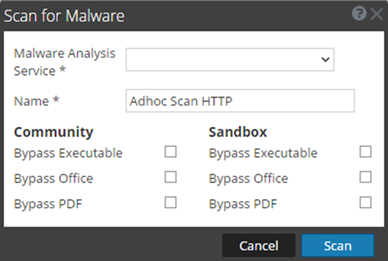
In the Scan for Malware dialog, Malware Analysis analysts can upload files to investigate in Malware Analysis.
To access this dialog go to the Malware Analysis view. In the Select a Malware Analysis Service dialog, select a service in the left panel, then click
in the right panel.
WorkflowWorkflow
What do you want to do?What do you want to do?
- User Role: Threat Hunter
- I want to ...:
browse event metadata
- Show me how:
NetWitness Investigate User Guide
- User Role: Threat Hunter
- I want to ...:
browse raw events
- Show me how:
NetWitness Investigate User Guide
- User Role: Threat Hunter
- I want to ...:
analyze raw events and metadata
- Show me how:
NetWitness Investigate User Guide
- User Role: Threat Hunter
- I want to ...: investigate endpoints (Version 11.1)
- Show me how:
NetWitness Endpoint User Guide
- User Role:
Threat Hunter
- I want to ...:
find suspicious endpoint files (Version 11.1)
- Show me how:
NetWitness Endpoint User Guide
- User Role: Threat Hunter
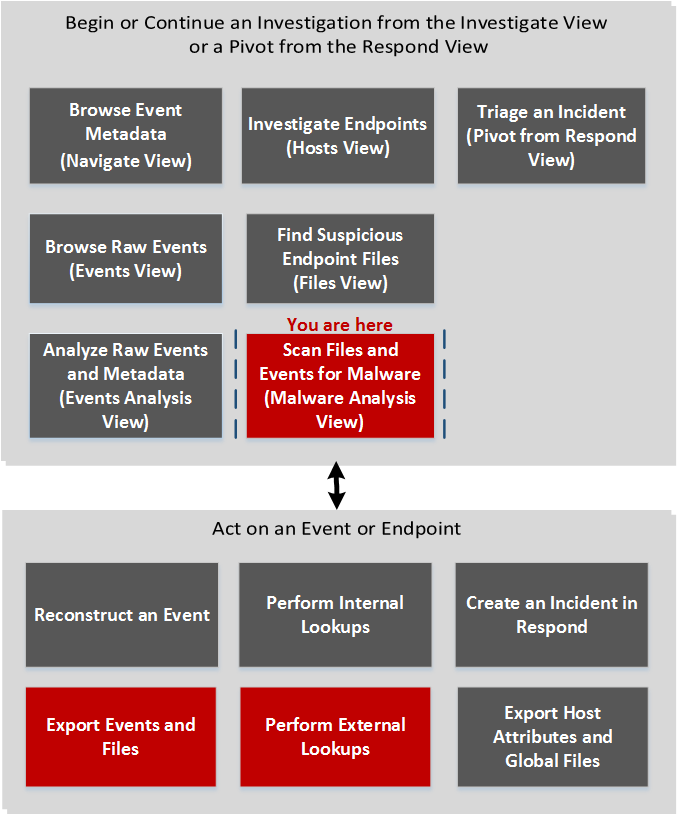
- I want to ...: scan files and events for malware*
- Show me how: Conducting Malware Analysis
- User Role:
Incident Responder
- I want to ...:
triage an incident in Investigate
- Show me how:
NetWitness Respond User Guide
*You can perform this task in the current view.
Related TopicsRelated Topics
- "How NetWitness Investigate Works" in the NetWitness Investigate User Guide
- Begin a Malware Analysis Investigation
- "Launch a Malware Analysis Scan from the Navigate View" in the NetWitness Investigate User Guide
Quick LookQuick Look
The figure below illustrates the Scan for Malware dialog, and The following table describes the features available in the dialog.
- Feature:

- Description: Uploads a file from your computer.
- Feature:

- Description: Deletes a file from the list.
- Feature: File Name
- Description: Displays the names of the files added to the list.
- Feature: Name
- Description: Allows you to name the scan job.
- Feature: Community
- Description: Displays options for Community to bypass or ignore certain types of files:
- Bypass Executable
- Bypass Office
- Bypass PDF
- Feature: Sandbox
- Description: Displays options for Sandbox to bypass or ignore certain types of files:
- Bypass Executable
- Bypass Office
- Bypass PDF
- Feature: Cancel
- Description: Closes the dialog without performing any actions.
- Feature: Scan
- Description: Scans the uploaded files.