.png?width=180&height=32&name=NW%20Logo%20(2).png)
Issue
- Receiving alarms from NetWitness Health and Wellness about high swap memory utilization.
- Not sure which process/service is using the most swap.
Resolution
Option 1: Download and run the swap_utilization.sh shell script
- Download the attached swap_utilization.sh shell script.
- Copy the shell script to the NetWitness appliance, for example to /tmp/swap_utilization.sh, then run the shell script. No arguments needed.
[root@sa-server ~]#
chmod +x /tmp/swap_utilization.sh
[root@sa-server ~]# /tmp/swap_utilization.sh
[root@sa-server ~]# /tmp/swap_utilization.sh
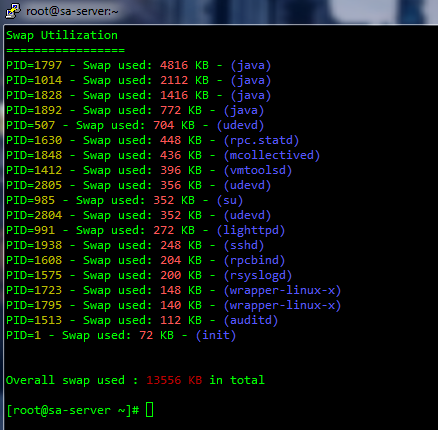
- Upon execution, it will list all processes utilizing swap memory, and sorted in decreasing order.
Option 2: Run commands directly from the command line
- ssh login to the NetWitness appliance and run the following command.
[root@sa-server ~]#
for file in /proc/*/status; do egrep "Swap|^Pid|Name" $file |tr "\n" " ";echo; done |grep Swap |grep -v " 0 kB" |column -t |sort -k 6n;for file in /proc/*/smaps; do grep Swap $file |awk '{print $2}'; done |grep -v ^0$ |awk '{total += $1} END {print "Total Swap Used:", total, "kB"}'
- Upon execution, it will list all processes utilizing swap memory, and sorted in increasing order.

Product Details
RSA Product Set: NetWitnessRSA Product/Service Type: All NetWitness
RSA Version/Condition: 11.x
Summary
Show the processes which are using the swap apce.
Approval Reviewer Queue
Technical approval queue