.png?width=180&height=32&name=NW%20Logo%20(2).png)
Issue
"Not Indexed" errors appears in the investigation page of Security Analytics UI. When this error occurs, users may not be able to drill into the meta values.Cause
This error may be caused by a load issue on the device being used for Investigation, such as when aggregation has fallen behind. It also may be simply an anomaly in the UI for which the root cause cannot be identified.
Workaround
This issue cannot be reproduced, however if the system is in good health, the "Not Indexed" errors can be cleared by switching to different meta group in the investigation page as shown as below: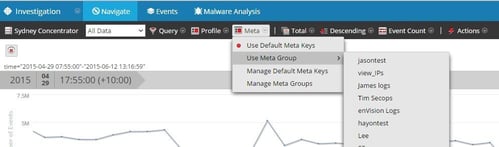
Resolution
First, check the concentrator or brokers overall system health, particularly aggregation. Aggregation issues can be caused by many reasons, such as the network physical layer problem, system overload, excessive rule processing, hardware issues etc. Start by doing an overall system health check of the device in the Security Analytics UI. If the system otherwise appears to be in good health and aggregation is not behind, use the workaround section listed below.
Product Details
RSA Product Set: Security AnalyticsRSA Product/Service Type: SA Core Appliance
RSA Version/Condition: 10.4.1.0
Summary
When performing Investigations, an error, Not Indexed, is seen.
Approval Reviewer Queue
ASOC Approval Group