.png?width=180&height=32&name=NW%20Logo%20(2).png)
Tags: Version 11.4
It is important that you use a firewall to restrict network traffic between RSA NetWitness Platform and external systems. RSA NetWitness Platform recommends that you configure firewall rules to help ensure secure communication for the following connections:
- Demilitarized zone (DMZ) to corporate network
- Corporate network to site sub network
- Site to site
- Live CMS to DMZ
- External email server to DMZ
Note: RSA recommends that you restrict access from client hosts to only known IP addresses. For example, if you set up the NetWitness Platform Client UI on IP address 192.168.0.1, configure your firewall to allow only the IP address 192.168.0.1 to connect to the NetWitness Platform host.
Note: The firewall rules should be configured on an external firewall and not on any of the NetWitness Platform host.
RSA recommends that you configure firewall rules as described in the sections below. These recommendations are based on the following assumptions:
- You have a stateful firewall, indicating that only the establishment of TCP ports is considered.
- You specify the direction of communication for the UDP ports because the connections are sessionless.
- You deploy NetWitness Platform as shown in the Security Controls Map.
- The firewall processes the rules top to bottom, finishing with a generic drop of all the packets.
DMZ to Corporate Network
RSA recommends that you:
- Configure whitelist communication from the VPN server in the DMZ to the client machines on which you run RSA NetWitness Platform applications such as NetWitness Platform Web UI.
- Create firewall rules for all the machines from which you intended to remotely access the corporate network through Remote Desktop Protocol (RDP).
Corporate Network to Site
RSA recommends that the firewall at each RSA NetWitness Platform site allow access only from designated client machines through a whitelisted IP address and port.
RSA recommends that you secure the following ports to ensure secure communication between the client machine that is set as the RSA NetWitness Platform Web UI and the NetWitness Platform site:
- TCP 443
For more information, see Communication Security Settings. To help ensure secure communication between the client machines that access the NetWitness Platform UI and a site, you must set up the firewall rules as shown below:
ALLOW $nwclient_IP to $nwsite_IP on port 443/tcp
DROP all from * to *
where nwclient_IP is the IP address assigned to the client machine that is set as the NetWitness Platform web UI and nwsite_IP is the IP address assigned to the Broker host within which the RSA NetWitness Platform web server is running.
Site to Site
RSA NetWitness Platform may run in multiple sub‐networks within your corporate network, called sites. You can configure RSA NetWitness Platform to allow the hosts located in one site to communicate with the hosts in another site.
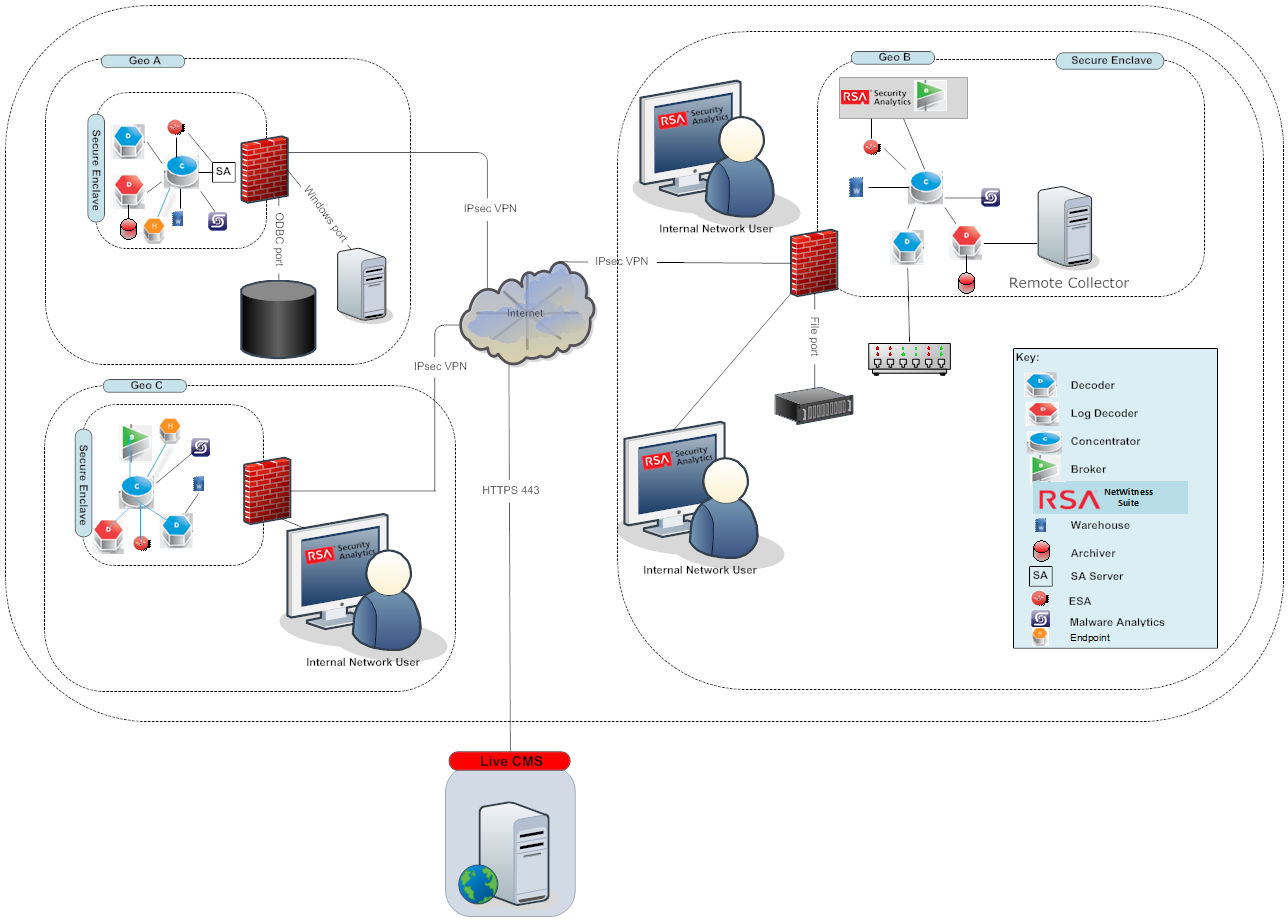 For this scenario, RSA recommends that you do the following:
- Ensure that the firewall at each RSA NetWitness Platform site allows communication between two sites only through a whitelisted IP address and port. For a graphical depiction of the site‐to‐site security control map showing the site firewalls, see the above figure.
- NetWitness Platform system update uses port 80. That means NetWitness Platform site to another site (where brokers, decoders exist), port 80 should be open.
Live CMS to DMZ
To ensure secure communication between the RSA NetWitness Platform site and Live CMS, set up the firewall rules as shown below:
ALLOW $nw_site_IP to $Live_IP on port 443/tcp
DROP all from * to *
where nw_site_IP and Live_IP are the IP addresses assigned to the NetWitness Platform site and the Live CMS respectively.
Note: If you are using proxy server with self-signed certificate, you must add exception in proxy server rule to allow traffic between Live CMS server (cms.netwitness.com, port 443) and NetWitness Platform.
RSA Download Central to DMZ
To ensure secure communication between the RSA NetWitness Platform site and RSA Download Central, set up the firewall rules as shown below:
ALLOW $nw_site_IP to $rsa_DLC_IP on port 80/tcp
DROP all from * to *
where nw_site_IP and rsa_DLC_IP are the IP addresses assigned to the NetWitness Platform site and RSA Download Central respectively.
External Email Server to DMZ
To ensure secure communication between the RSA NetWitness Platform site and the External Email Server, set up the firewall rules as shown below:
ALLOW $nw_site_IP to $Email_IP on port 443/tcp
DROP all from * to *
where nw_site_IP and Email_IP are the IP addresses assigned to the NetWitness Platform site and the external email server respectively.
Syslog Server to Site
If you have enabled the syslog port, to ensure secure communication between the RSA NetWitness Platform site and the Syslog Server, set up the firewall rules as shown below:
ALLOW $nw_site_IP to $Syslog_IP on port 514/udp
DROP all from * to *
where nw_site_IP and Syslog_IP are the IP addresses assigned to the NetWitness Platform site and the syslog server respectively.
SNMP Server to Site
If you have enabled the SNMP port, to ensure secure communication between the RSA NetWitness Platform site and the SNMP Server, set up the firewall rules as shown below:
ALLOW $nw_site_IP to $SNMP_IP on port 1610/SNMP
DROP all from * to *
where nw_site_IP and SNMP_IP are the IP addresses assigned to the NetWitness Platform site and the SNMP server respectively.