Skip to content
  • There are no suggestions because the search field is empty.

Services Config View - Auditing Tab

Services Config View - Auditing Tab

This topic introduces the features and functions of the Auditing tab in the Services Config view for Malware Analysis. The Auditing tab in the Services Config view for Malware Analysis provides a way to configure the auditing feature. Malware Analysis has an automated auditing system capable of sending alerts (syslog, snmp, audit log file entries) as Malware Analysis exceeds configured score value thresholds for each scoring module (Network, Static, Community, Sandbox). Malware Analysis can automatically feed any external system capable of ingesting the supported audit formats. One alert is generated for each file in an analyzed session that meets or exceeds the configure threshold.
The audit log is a log file maintained on the Malware Analysis appliance for every significant event or action. Audit logs are rolled out and archived over time as they become large so an audit history is maintained. The size of these audit logs and their number are both configurable.
Some examples of events that are logged are:

  • User login successes and failures
  • Changes to system configuration settings
  • Server restart
  • Server version upgrade and install
  • Suspicious events that exceed the Audit Thresholds

Malware Analysis can send audit events as an SNMP trap to a configured SNMP trap host, and consolidate logs in syslog format. Refer to the following task topic for detailed procedures: (Optional) Configure Auditing on Malware Analysis Host.

Workflow
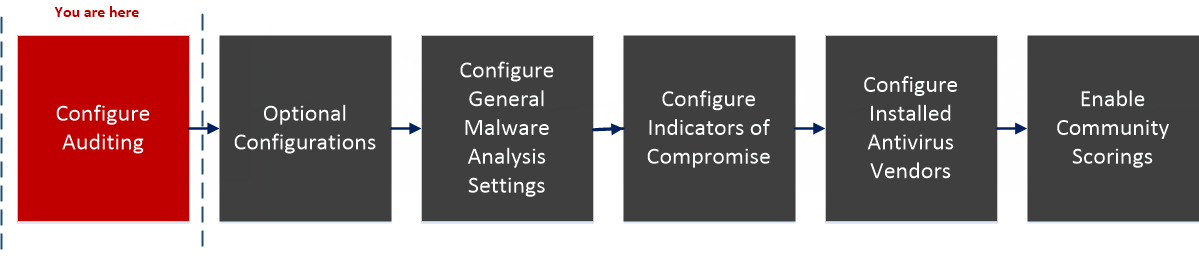
netwitness_113_malware_configworkflow_step1.png

What do you want to do?


*You can perform this task in the current view

Related Topics

Basic Setup

Quick Look

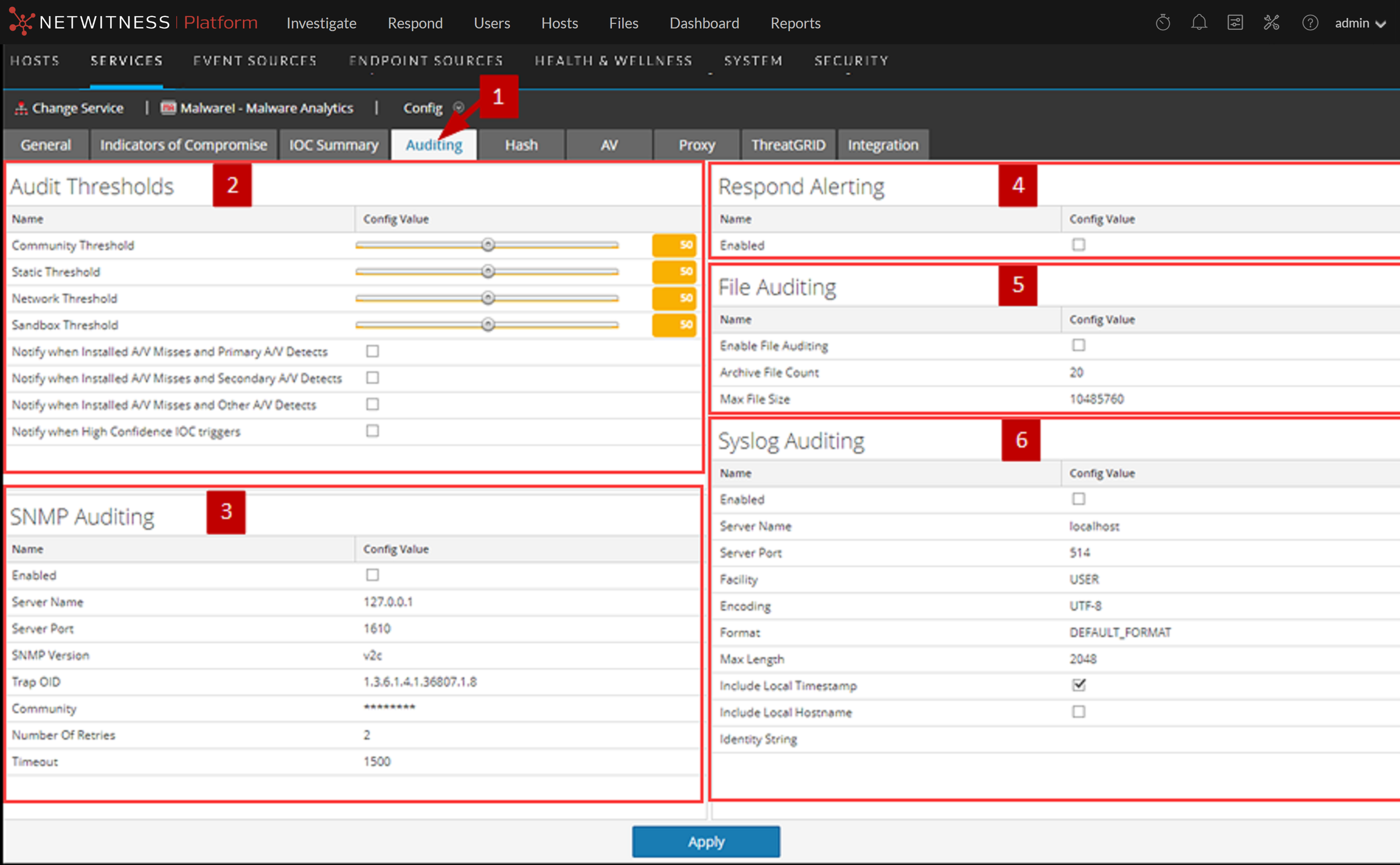
This is an example of the Auditing tab.
122_AuditTab_1222.png

  • Column 1: 1
  • Column 2:

    Displays the Auditing Tab.


  • Column 1: 2
  • Column 2:

    Displays the Audit Thresholds section.


  • Column 1: 3
  • Column 2:

    Displays the SNMP Auditing section.


  • Column 1: 4
  • Column 2:

    Displays the Respond Alerting section.


  • Column 1: 5
  • Column 2:

    Displays the File Auditing section.


  • Column 1: 6
  • Column 2:

    Displays the Syslog Auditing section.


Features

The Auditing tab includes five sections and an Apply button used to save changes made in this tab and put them into effect.

  • Auditing Thresholds
  • SNMP Auditing
  • Respond Alerting
  • File Auditing
  • Syslog Auditing

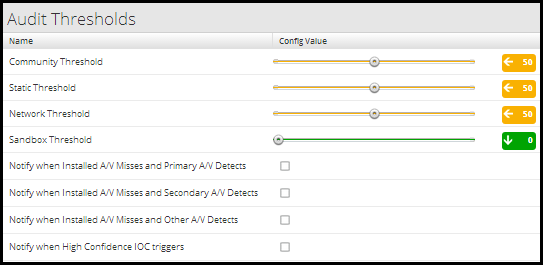
Audit Thresholds

netwitness_maauditthresholds.png

This table describes the features in the Audit Thresholds section.

  • Name: Community, Static, Network, and Sandbox Thresholds
  • Config Value:

    Malware Analysis scoring module thresholds for recording event information in a log file. Malware Analysis records the event information in a log file if the event scored high enough to satisfy all of the auditing thresholds. Each scoring category that completed analysis (for example, not all sessions invoke sandbox analysis) is compared against the configured audit threshold for that category. Any one of the category must exceed the threshold in order for an audit event to be triggered.

    An integer between 0 and 100 is a valid value. Setting these thresholds too low may cause a very large volume of audit events and notifications.


  • Name: Notify when Installed A/V Misses and Primary A/V Detects
  • Config Value:

    Records a message in a log file when installed antivirus software misses a virus and the primary antivirus software detects that virus. The recorded message is sent through all enabled auditing methods: SNMP, File, and Syslog.
    The default value is unchecked.


  • Name: Notify when Installed A/V Misses and Secondary A/V Detects
  • Config Value:

    Records a message in a log file when installed antivirus software misses a virus and the secondary antivirus software detects that virus. The recorded message is sent through all enabled auditing methods: SNMP, File, and Syslog.
    The default value is unchecked.


  • Name: Notify when Installed A/V Misses and Other A/V Detects
  • Config Value:

    Records a message in a log file when installed antivirus software misses a virus and the other antivirus software detects that virus. The recorded message is sent through all enabled auditing methods: SNMP, File, and Syslog.

    The default value is unchecked.


  • Name: Notify when High Confidence IOC triggers
  • Config Value:

    Records a message in a log file when a high confidence IOC (Indicators of Compromise) triggers. The recorded message is sent through all enabled auditing methods: SNMP, File, and Syslog.

    The default value is unchecked.


SNMP Auditing

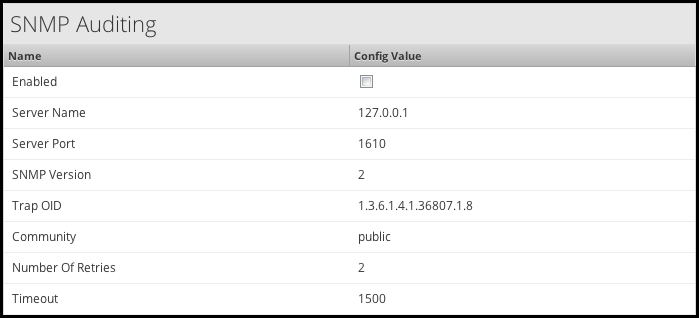
The Simple Network Management Protocol (SNMP) is an Internet-standard protocol for managing services on IP networks. When SNMP auditing is enabled, Malware Analysis can send an audit event as an SNMP trap to a configured SNMP trap host.
netwitness_masnmpauditing.png

This table describes the features in the SNMP Auditing section.

  • Name: Enabled
  • Config Value: Click to enable or disable SNMP auditing.

  • Name: Server Name
  • Config Value: The host where the target SNMP server is running.

  • Name: Server Port
  • Config Value: The port used where the SNMP trap receiver is listening.

  • Name: SNMP Version
  • Config Value: The version of the SNMP protocol to use when sending traps.

  • Name: Trap OID
  • Config Value: The object ID to use to identify the type of trap to send.

  • Name: Community
  • Config Value: The SNMP group to which Malware Analysis belongs.

  • Name: Number Of Retries
  • Config Value: The number of retries for sending a trap.

  • Name: Timeout
  • Config Value: The timeout period to wait for acknowledgment.

Respond Alerting

The Respond Alerting section enables NetWitness Respond to receive alerts from Malware Analysis. Select Enabled to forward alerts to the Respond view.

netwitness_ma_respdalertingsection_624x93.png

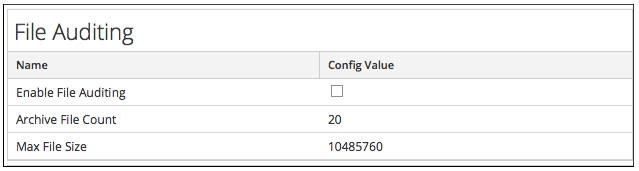
File Auditing

netwitness_maaudittabfile.png

This table describes the features in the File Auditing section. Avoid setting the max file size and archive file count too high because it may have an adverse effect on the available disk space on the Malware Analysis appliance.

  • Name: Enable File Auditing
  • Config Value:

    Click to enable or disable file auditing.


  • Name: Archive File Count
  • Config Value:

    Malware Analysis keeps only as many log files as defined by this setting. When the maximum number is reached, the oldest log files are deleted and cannot be recovered.
    The default value is 20. Valid value: Integer between 1 and 50, inclusive.


  • Name: Max File Size
  • Config Value:

    The maximum file size for a single auditing log before it is archived. The default value is 10485760 bytes.


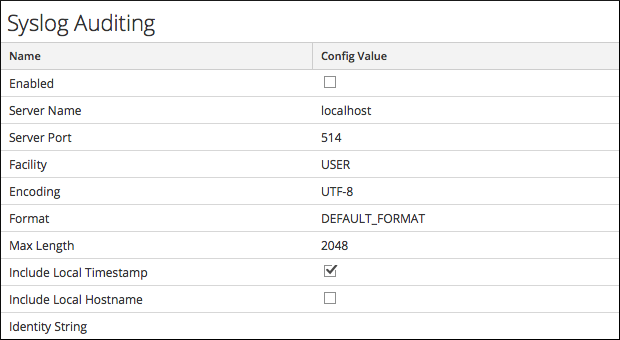
Syslog Auditing

netwitness_maauditingtabsyslog.png

This table describes the features in the Audit Thresholds section.

  • Feature: Enabled
  • Description: Click to enable or disable syslog auditing.

  • Feature: Server Name
  • Description: This is the host where the target syslog process is running.

  • Feature: Server Port
  • Description: This is the port where the target syslog process is listening.

  • Feature: Facility
  • Description: This is the designated syslog facility to use for all outgoing messages. Possible values are KERN, USER, MAIL, DAEMON, AUTH, SYSLOG, LPR, NEWS, UUCP, CRON, AUTHPRIV, and LOCAL1 through LOCAL7.

  • Feature: Encoding
  • Description: This is the encoding to use for text in syslog messages; for example, UTF-8.

  • Feature: Format
  • Description: This is the desired message format. Possible values are: Default, PCI DSS, or SEC.

  • Feature: Max Length
  • Description: This is the maximum length in bytes that any syslog message can be. Default is 1024. Messages that exceed the maximum length are truncated.

  • Feature: Include Local Timestamp
  • Description: Check this box to include the local timestamp in messages.

  • Feature: Include Local Hostname
  • Description: Check this box to include the local hostname.

  • Feature: Identity String
  • Description: This is an identity string to be prepended to each syslog alert. If the string is blank, no identity string is prepended to the outgoing syslog alerts. You can use this to identify the source of the alert. Users conventionally set it to the name of the program that will submit the messages to a syslog auditing.