.png?width=180&height=32&name=NW%20Logo%20(2).png)
Services Config View - Feeds Tab
Feeds and parsers are Lua programs loaded and compiled when either processing capture files in NetWitness Investigate or capturing data with Decoders. Most commonly, they are used for static meta extraction and service identification.
NetWitness uses feeds to create metadata based on externally defined meta values. A feed is a list of data that is compared to sessions as they are captured or processed. For each match, additional metadata is created. This data can identify and classify malicious IPs or incorporate additional information such as department and location based on internal network assignments. Some examples of feeds include threat feeds to identify BOTNets, DHCP mappings, or even active directory information such as physical location or logical department.
Feeds can be added, removed, and updated while a Decoder is running without affecting capture. The Feeds tab (  (Admin) > Services > select a Decoder or Log Decoder service and click
  > View > Config > Feeds tab) provides a user interface for managing feeds on Decoders.
What do you want to do?
Related Topics
Quick Look
This is an example of the Feeds tab.
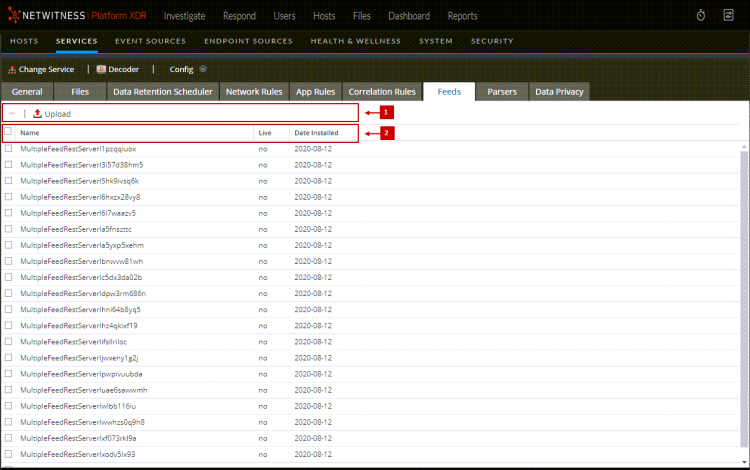
Feeds Tab Toolbar
Feeds List
The Feeds list provides a listing of all currently deployed feeds for the Decoder.