Services Config View - Upload Feeds Dialog
Upload Feeds DialogUpload Feeds Dialog
This topic describes the features of the Upload Feeds dialog in the Services Config view > Feeds tab.
The Upload option in the Services Config view > Feeds tab displays the Upload Feeds Dialog, in which you can manage the uploading of feeds to a Decoder or Log Decoder.
What do you want to do?
- User Role: Administrator
- I want to...: prepare a list of feeds for upload
- Documentation: Edit, Upload, or Remove a Feed
- User Role: Administrator
- I want to...: view and delete upload jobs
- Documentation: Edit, Upload, or Remove a Feed
Related Topics
Quick Look
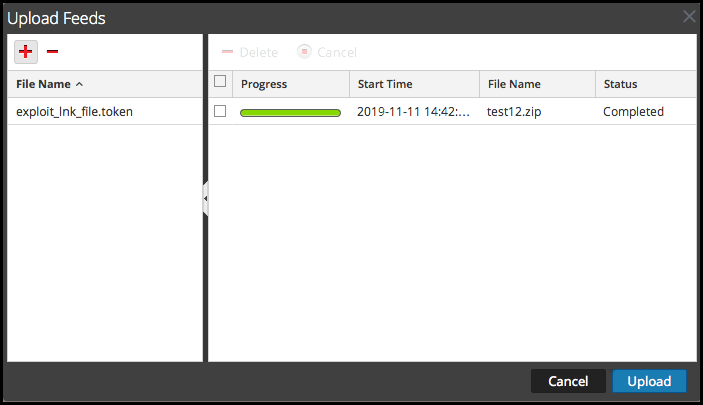
This is an example of the Upload Feeds dialog.
File List
The File list is the place to prepare a list of feeds for uploading. You can add files from a directory structure, and delete files from the list if you decide that you don't want to upload a particular file. When the list is ready, clicking Upload starts the upload process.
- Feature:

- Description: Opens a view of the directory structure where you can select files to add to the File list.
- Feature:

- Description: Deletes the selected files from the File list.
- Feature: File Name
- Description: Lists the feed files you have added from a file system in preparation for uploading to a Decoder. When you click Upload, the files listed here are uploaded.
Upload Job List
The Upload Job list provides a view of upload jobs started by clicking Upload.
- Feature/Column:

- Description: Deletes an upload job.
- Feature/Column: Progress
- Description: Displays progress of an upload job.
- Feature/Column: Start Time
- Description: Displays the start time of an upload job.
- Feature/Column: File Name
- Description: Lists filename of the feed being uploaded.
- Feature/Column: Status
- Description: Displays the status of upload job.
Upload Feeds Dialog Buttons
- Feature: Cancel
- Description: Closes the Upload Feed dialog.
- Feature: Upload
- Description: Starts uploading the feed files listed in the File list. Each feed is listed in a separate row in the Upload job list.