Services System View - Host Task List Dialog
Services System View - Host Task List DialogServices System View - Host Task List Dialog
In the NetWitness Services System view, you can use the Host Tasks option to manage tasks that relate to a host and its communications with the network. Several service and host configuration options are available for Core services.
Workflow
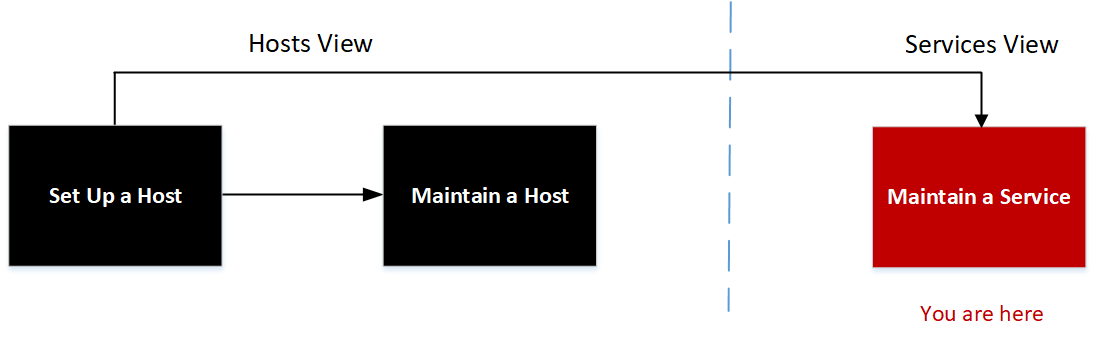
What do you want to do?
- User Role: Administrator
- I want to...: set up a host.
- Documentation:
- User Role: Administrator
- I want to...: maintain a host.
- Documentation: Maintaining Hosts
- User Role:
Administrator
- I want to...: maintain a service.
- Documentation:
- User Role: Administrator
- I want to...: manage host-related tasks and host communications with the network.*
- Documentation: Hosts and Services Maintenance Procedures
* You can perform these tasks in the current view.
Related Topics
Quick Look
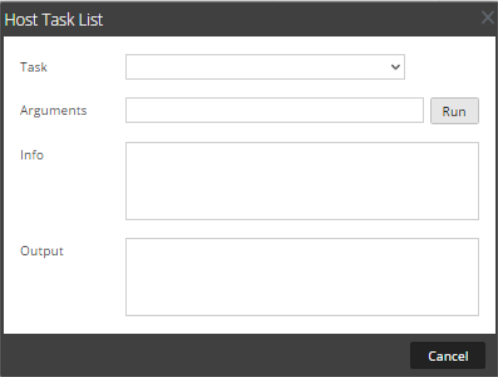
The table below describes the Host Task List dialog features.
- Column 1: Field
- Column 2: Description
- Column 1: Task
- Column 2: An entry field in which you type or select a message for a Core host. When you click in this field a drop-down list of available host tasks is displayed.
- Column 1: Arguments
- Column 2: An entry field in which you enter the arguments, if any, for the message.
- Column 1: Run
- Column 2: Executes the task and arguments in the entry fields.
- Column 1: Info
- Column 2: Information about the message purpose and syntax.
- Column 1: Output
- Column 2: The output or result of an executed task.
- Column 1: Cancel
- Column 2: Closes the Host Task list dialog.
Host Task Selection List
These tasks are displayed as a drop-down list in the Task field. The available options are regulated by the security role required to execute the option.
- Task: Add Filesystem Monitor
- Description: Starts monitoring the storage services attached to the specified filesystem. See Add and Delete a Filesystem Monitor.
- Task: Delete Filesystem Monitor
- Description: Stops monitoring the storage services attached to the specified filesystem. See Add and Delete a Filesystem Monitor.
- Task: Reboot Host
- Description: Shuts down and restarts the host. See Reboot a Host.
- Task: Set Host Built-in Clock
- Description: Sets the local host clock. See Set Host Built-In Clock.
- Task: Set Host Hostname
- Description: This method of changing the hostname is deprecated in NetWitness 10.6. To edit a hostname, see Edit or Delete a Service.
- Task: Set Network Time Source
- Description: Sets the clock source for this host. See Set Network Time Source.
- Task: Set Syslog Forwarding
- Description: Enables or disables syslog forwarding from a remote server to the selected service. See Set Syslog Forwarding.
- Task: Show Network Port Status
- Description: Shows the network interface information for a host. See Show Network Port Status.
- Task: Show Serial Number
- Description: Gets the host serial number. See Show Serial Number.
- Task: Shut Down Host
- Description: Shuts down the physical host and the host remains off. See Shut Down Host.
- Task: Start Service
- Description: Starts a service on this host. See Stop and Start a Service on a Host.
- Task: Stop Service
- Description: Stops a service on this host. See Stop and Start a Service on a Host.
- Task: setSNMP
- Description: Enables or disables the SNMP service on a host. See Set SNMP.