.png?width=180&height=32&name=NW%20Logo%20(2).png)
Issue
When this condition occurs, it will be evident by the following:- Log Decoder Event Queue full (or increasing) H&W alarms
- Syslog collection stopping for that Decoder (cannot find recent logs in Investigate)
- logs in /var/log/messages that resemble the following:
Oct 20 22:26:15 NW-PROD-LD34 NwLogDecoder[11127]: [SYSLOG] [warning] Over-long message detected from 127.0.0.1:53114 received on syslog receiver: [][svpixn-vm-vlc03][10.165.181.104][1666292785095][] Oct 20 20:06:25 PCCQY-8H3B322.eu.global.prv MSW
Oct 20 22:26:15 NW-PROD-LD34 NwLogDecoder[11127]: [SYSLOG] [warning] Unidentified content received on syslog connection 127.0.0.1:53114: 'canForUpdatesFailure0
Response: Not available
Cab Id: 0
'
Oct 20 22:26:15 NW-PROD-LD34 NwLogDecoder[11127]: [SYSLOG] [warning] Unexpected protocol change on syslog connection 127.0.0.1:53114 from 'Syslog' to 'Unknown', closing connection.
Oct 20 22:26:15 NW-PROD-LD34 NwLogCollector[12330]: [TCPConnector] [info] Socket disconnected: Broken pipe
Oct 20 22:26:15 NW-PROD-LD34 NwLogCollector[12330]: [TCPConnector] [info] Event dispatch failed. Retry after 5 seconds
Oct 20 22:26:20 NW-PROD-LD34 NwLogCollector[12330]: [TCPConnector] [info] Connected to endpoint at [127.0.0.1]:514.
Oct 20 22:26:15 NW-PROD-LD34 NwLogDecoder[11127]: [SYSLOG] [warning] Unidentified content received on syslog connection 127.0.0.1:53114: 'canForUpdatesFailure0
Response: Not available
Cab Id: 0
'
Oct 20 22:26:15 NW-PROD-LD34 NwLogDecoder[11127]: [SYSLOG] [warning] Unexpected protocol change on syslog connection 127.0.0.1:53114 from 'Syslog' to 'Unknown', closing connection.
Oct 20 22:26:15 NW-PROD-LD34 NwLogCollector[12330]: [TCPConnector] [info] Socket disconnected: Broken pipe
Oct 20 22:26:15 NW-PROD-LD34 NwLogCollector[12330]: [TCPConnector] [info] Event dispatch failed. Retry after 5 seconds
Oct 20 22:26:20 NW-PROD-LD34 NwLogCollector[12330]: [TCPConnector] [info] Connected to endpoint at [127.0.0.1]:514.
- Missing consumers when reviewing the queues with rabbitmqctl:
[root@NW-PROD-LD34 rabbit@16b0e820-883a-485c-9de4-edca6ca8ea8d]# rabbitmqctl list_queues name messages consumers -p logcollection | column -t
Timeout: 60.0 seconds ...
Listing queues for vhost logcollection ...
name messages consumers
LogDecoder.logdecoder.odbc 0 1
LogDecoder.logdecoder.syslog 5835982701 0
LogDecoder.logdecoder.checkpoint 0 1
LogDecoder.logdecoder.vmware 0 1
LogDecoder.logdecoder.sdee 0 1
LogDecoder.logdecoder.windowslegacy 0 1
LogDecoder.logdecoder.file 0 1
LogDecoder.logdecoder.cmdscript 0 1
rabbitmq.log 0 1
LogDecoder.logdecoder.netflow 0 1
LogDecoder.logdecoder.windows 0 1
LogDecoder.logdecoder.snmptrap 0 1
Timeout: 60.0 seconds ...
Listing queues for vhost logcollection ...
name messages consumers
LogDecoder.logdecoder.odbc 0 1
LogDecoder.logdecoder.syslog 5835982701 0
LogDecoder.logdecoder.checkpoint 0 1
LogDecoder.logdecoder.vmware 0 1
LogDecoder.logdecoder.sdee 0 1
LogDecoder.logdecoder.windowslegacy 0 1
LogDecoder.logdecoder.file 0 1
LogDecoder.logdecoder.cmdscript 0 1
rabbitmq.log 0 1
LogDecoder.logdecoder.netflow 0 1
LogDecoder.logdecoder.windows 0 1
LogDecoder.logdecoder.snmptrap 0 1
- tcpdump showing huge messages (this may be harder to catch):
522:24:55.162159 IP NW-PROD-LD34.52990 > NW-PROD-LD34.shell: Flags [.], seq 4255796:4321279, ack 1, win 171, options [nop,nop,TS val 5348229 ecr 5348228], length 65483
622:24:55.162217 IP NW-PROD-LD34.52990 > NW-PROD-LD34.shell: Flags [.], seq 4321279:4386762, ack 1, win 171, options [nop,nop,TS val 5348229 ecr 5348228], length 65483
722:24:55.162662 IP NW-PROD-LD34.52990 > NW-PROD-LD34.shell: Flags [.], seq 4386762:4452245, ack 1, win 171, options [nop,nop,TS val 5348229 ecr 5348229], length 65483
822:24:55.162679 IP NW-PROD-LD34.52990 > NW-PROD-LD34.shell: Flags [.], seq 4452245:4517728, ack 1, win 171, options [nop,nop,TS val 5348229 ecr 5348229], length 65483
922:24:55.162695 IP NW-PROD-LD34.52990 > NW-PROD-LD34.shell: Flags [.], seq 4517728:4583211, ack 1, win 171, options [nop,nop,TS val 5348229 ecr 5348229], length 65483
622:24:55.162217 IP NW-PROD-LD34.52990 > NW-PROD-LD34.shell: Flags [.], seq 4321279:4386762, ack 1, win 171, options [nop,nop,TS val 5348229 ecr 5348228], length 65483
722:24:55.162662 IP NW-PROD-LD34.52990 > NW-PROD-LD34.shell: Flags [.], seq 4386762:4452245, ack 1, win 171, options [nop,nop,TS val 5348229 ecr 5348229], length 65483
822:24:55.162679 IP NW-PROD-LD34.52990 > NW-PROD-LD34.shell: Flags [.], seq 4452245:4517728, ack 1, win 171, options [nop,nop,TS val 5348229 ecr 5348229], length 65483
922:24:55.162695 IP NW-PROD-LD34.52990 > NW-PROD-LD34.shell: Flags [.], seq 4517728:4583211, ack 1, win 171, options [nop,nop,TS val 5348229 ecr 5348229], length 65483
Cause
This is caused by a syslog message exceeding 32KB (default) or 64KB (tuned via Log Decoder\Explore\LogDecoder\Config\pool.packet.page.size = 64KB) which get truncated and therefore the protocol is unable to be determined by the LD itself. When enough of these messages come through, rabbitmq disables the connection.
Workaround
Keep in mind, that if the event source that is sending these huge syslog messages is not fixed or disabled, the situation will return almost immediately. If you are unable to disable the event source, you can temporarily block it by adding rules to the remote collector's iptables with these examples:
iptables -I INPUT -s 192.168.5.200 -j DROP
Then list out the rules to ensure it applied:
[root@NW11-LOG-HYBRID ~]# iptables --list-rules
-P INPUT DROP
-P FORWARD DROP
-P OUTPUT ACCEPT
-A INPUT -s 192.168.5.200/32 -j DROP
-A INPUT -m conntrack --ctstate RELATED,ESTABLISHED -j ACCEPT
-A INPUT -i lo -j ACCEPT
-A INPUT -m conntrack --ctstate INVALID -j DROP
-A INPUT -p tcp -m tcp -m multiport --dports 22 -m comment --comment SSH -m conntrack --ctstate NEW -j ACCEPT
-A INPUT -p udp -m udp -m multiport --dports 123 -m comment --comment ntp -m conntrack --ctstate NEW -j ACCEPT
-A INPUT -p tcp -m tcp -m multiport --dports 5671 -m comment --comment rabbitmq-amqp -m conntrack --ctstate NEW -j ACCEPT
-A INPUT -p tcp -m tcp -m multiport --dports 15671 -m comment --comment rabbitmq-mgmt -m conntrack --ctstate NEW -j ACCEPT
-A INPUT -p tcp -m tcp -m multiport --dports 50006,50106,56006 -m comment --comment nwappliancePorts -m conntrack --ctstate NEW -j ACCEPT
-A INPUT -p tcp -m tcp -m multiport --dports 7020 -m comment --comment NodeInfraServerPort -m conntrack --ctstate NEW -j ACCEPT
-A INPUT -p tcp -m tcp -m multiport --dports 50005,50105,56005 -m comment --comment nwconcentratorPorts -m conntrack --ctstate NEW -j ACCEPT
-A INPUT -p tcp -m tcp -m multiport --dports 6514,50002,50102,50202,56002,56202 -m comment --comment nwlogdecoderPorts -m conntrack --ctstate NEW -j ACCEPT
-A INPUT -p tcp -m tcp -m multiport --dports 514,5671,6514,50001,50101,56001 -m comment --comment nwlogcollectorTcpPorts -m conntrack --ctstate NEW -j ACCEPT
-A INPUT -p udp -m udp -m multiport --dports 162,514,2055,4739,6343,9995 -m comment --comment nwlogcollectorUdpPorts -m conntrack --ctstate NEW -j ACCEPT
-A INPUT -p tcp -m tcp -m multiport --dports 21,64000,64001,64002,64003,64004,64005,64006,64007,64008,64009 -m comment --comment nwlogcollectorFTPSPorts -m conntrack --ctstate NEW -j ACCEPT
-A INPUT -j DROP
-A FORWARD -j DROP
-A OUTPUT -j ACCEPT
-P INPUT DROP
-P FORWARD DROP
-P OUTPUT ACCEPT
-A INPUT -s 192.168.5.200/32 -j DROP
-A INPUT -m conntrack --ctstate RELATED,ESTABLISHED -j ACCEPT
-A INPUT -i lo -j ACCEPT
-A INPUT -m conntrack --ctstate INVALID -j DROP
-A INPUT -p tcp -m tcp -m multiport --dports 22 -m comment --comment SSH -m conntrack --ctstate NEW -j ACCEPT
-A INPUT -p udp -m udp -m multiport --dports 123 -m comment --comment ntp -m conntrack --ctstate NEW -j ACCEPT
-A INPUT -p tcp -m tcp -m multiport --dports 5671 -m comment --comment rabbitmq-amqp -m conntrack --ctstate NEW -j ACCEPT
-A INPUT -p tcp -m tcp -m multiport --dports 15671 -m comment --comment rabbitmq-mgmt -m conntrack --ctstate NEW -j ACCEPT
-A INPUT -p tcp -m tcp -m multiport --dports 50006,50106,56006 -m comment --comment nwappliancePorts -m conntrack --ctstate NEW -j ACCEPT
-A INPUT -p tcp -m tcp -m multiport --dports 7020 -m comment --comment NodeInfraServerPort -m conntrack --ctstate NEW -j ACCEPT
-A INPUT -p tcp -m tcp -m multiport --dports 50005,50105,56005 -m comment --comment nwconcentratorPorts -m conntrack --ctstate NEW -j ACCEPT
-A INPUT -p tcp -m tcp -m multiport --dports 6514,50002,50102,50202,56002,56202 -m comment --comment nwlogdecoderPorts -m conntrack --ctstate NEW -j ACCEPT
-A INPUT -p tcp -m tcp -m multiport --dports 514,5671,6514,50001,50101,56001 -m comment --comment nwlogcollectorTcpPorts -m conntrack --ctstate NEW -j ACCEPT
-A INPUT -p udp -m udp -m multiport --dports 162,514,2055,4739,6343,9995 -m comment --comment nwlogcollectorUdpPorts -m conntrack --ctstate NEW -j ACCEPT
-A INPUT -p tcp -m tcp -m multiport --dports 21,64000,64001,64002,64003,64004,64005,64006,64007,64008,64009 -m comment --comment nwlogcollectorFTPSPorts -m conntrack --ctstate NEW -j ACCEPT
-A INPUT -j DROP
-A FORWARD -j DROP
-A OUTPUT -j ACCEPT
Once the event source has been fixed, you can remove the rules with:
iptables -D INPUT -s 192.168.5.200 -j DROP
Resolution
Disclaimer: The following steps will result in a loss of logs that are currently being processed from the Local Log Collector Service and the Log Decoder parsing engine. Due to the nature of bundling of various logs in rabbitmq's message bus, purging specific logs is impossible. Any log messages contained on disk (as RDQ files) or in-memory will be lost. Reinjecting RDQ files will likely lead to a similar problem as the over-long syslog messages are still present in those as well.The resolution is summarized as the following:
- systemctl stop nwlogcollector
- systemctl stop rabbitmq-server
- cd to (your paths will have different IDs)
- /var/netwitness/rabbitmq/mnesia/rabbit@a71aa275-171f-4d62-bc6d-0c8907cdf0c1/msg_stores/vhosts/628WB79CIFDYO9LJI6DKMI09L/msg_store_persistent/
- Note that your directory will be different, but will resemble rabbit@a71aa275-171f-4d62-bc6d-0c8907cdf0c1
- There may also be several subdirectories under vhosts, ensure you clean each one
- delete all *.rdq files in msg_store_persistent and msg_store_transient . Do this for both unique vhosts
- /var/netwitness/rabbitmq/mnesia/rabbit@a71aa275-171f-4d62-bc6d-0c8907cdf0c1/msg_stores/vhosts/628WB79CIFDYO9LJI6DKMI09L/msg_store_persistent/
- systemctl start rabbitmq-server
- wait until it’s up, then run the following to purge all queues that still have messages (checking with : rabbitmqctl list_queues -p logcollection name messages consumers )
-
- rabbitmqctl purge_queue -p logcollection LogDecoder.logdecoder.syslog
- rabbitmqctl purge_queue -p logcollection LogDecoder.logdecoder.file
- rabbitmqctl purge_queue -p logcollection LogDecoder.logdecoder.odbc
- rabbitmqctl purge_queue -p logcollection LogDecoder.logdecoder.cmdscript
- In my examples I have included several message queues, but you only need to purge the ones missing consumers and/or a non-zero amount of messages in them
- Start the logcollector :
- systemctl start nwlogcollector
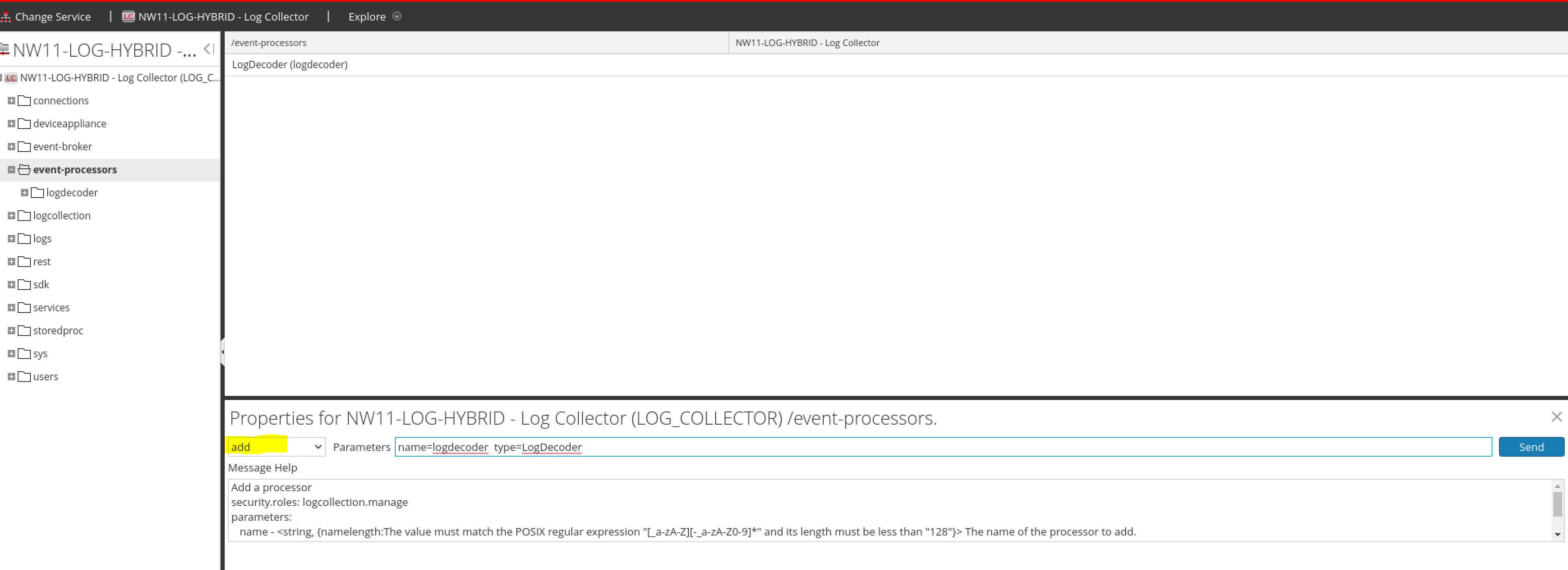
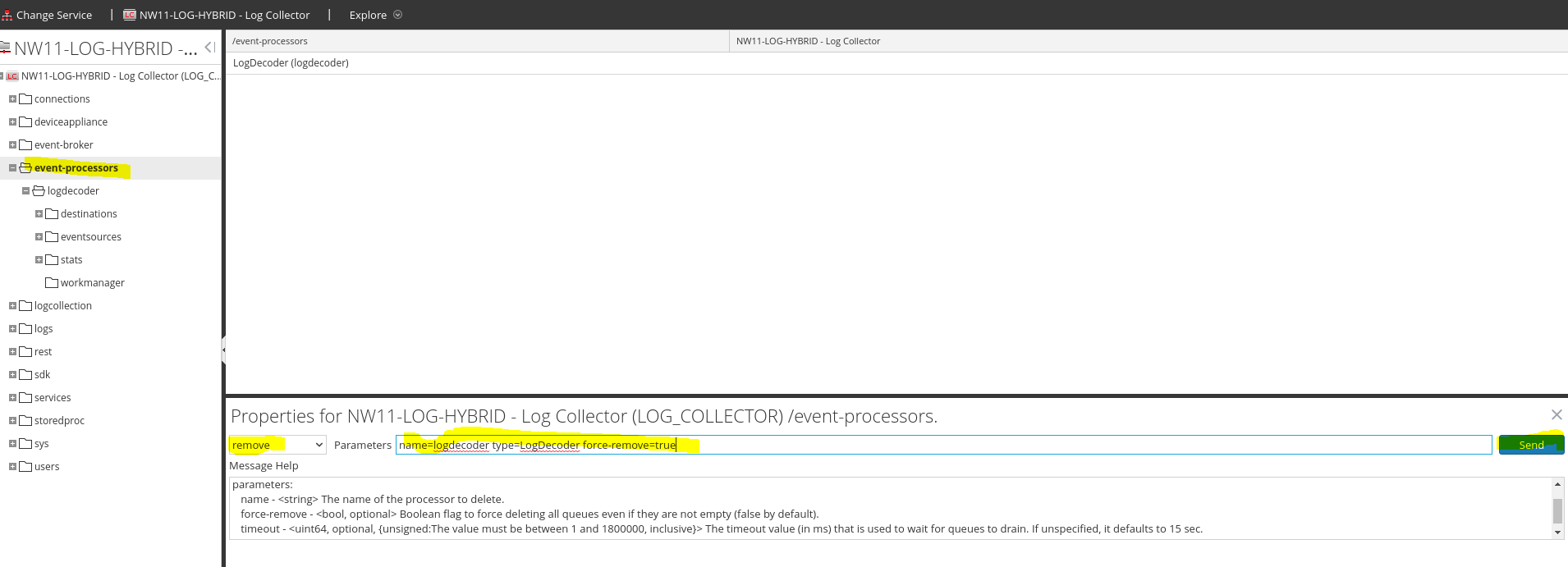
- Then as soon as it’s up (this has to be done quickly), Delete the event-processor\logdecoder queue from Explore on the Local Collector by right clicking "event-processors", choosing properties and passing it the following parameters:
- Then re-add it with the add command rather than remove:
[root@NW-PROD-LD34 rabbit@16b0e820-883a-485c-9de4-edca6ca8ea8d]# rabbitmqctl list_queues name messages consumers -p logcollection | column -t
Timeout: 60.0 seconds ...
Listing queues for vhost logcollection ...
name messages consumers
LogDecoder.logdecoder.odbc 0 1
LogDecoder.logdecoder.syslog 0 1
LogDecoder.logdecoder.checkpoint 0 1
LogDecoder.logdecoder.vmware 0 1
LogDecoder.logdecoder.sdee 0 1
LogDecoder.logdecoder.windowslegacy 0 1
LogDecoder.logdecoder.file 0 1
LogDecoder.logdecoder.cmdscript 0 1
rabbitmq.log 0 1
LogDecoder.logdecoder.netflow 0 1
LogDecoder.logdecoder.windows 0 1
LogDecoder.logdecoder.snmptrap 0 1
Timeout: 60.0 seconds ...
Listing queues for vhost logcollection ...
name messages consumers
LogDecoder.logdecoder.odbc 0 1
LogDecoder.logdecoder.syslog 0 1
LogDecoder.logdecoder.checkpoint 0 1
LogDecoder.logdecoder.vmware 0 1
LogDecoder.logdecoder.sdee 0 1
LogDecoder.logdecoder.windowslegacy 0 1
LogDecoder.logdecoder.file 0 1
LogDecoder.logdecoder.cmdscript 0 1
rabbitmq.log 0 1
LogDecoder.logdecoder.netflow 0 1
LogDecoder.logdecoder.windows 0 1
LogDecoder.logdecoder.snmptrap 0 1
After 15-20 minutes, check again in Investigate and ensure syslog messages are now being processed
Notes
This defect is currently scheduled to be addressed and fixed in 11.7.2
Product Details
NetWitness Product Set: NetWitness PlatformNetWitness Product/Service Type: Log Decoder/Local Log Collector
NetWitness Version/Condition:11.x, 12.x
Platform: CentOS 7 / Alma
Summary
When Syslog messages exceeding 32KB or 64KB per message are sent from a Remote Log Collector the the Local Log Collector/Decoder, it breaks the connection from the Local Log Collector to the Log Decoder. To resolve this, you must ensure the source sending those logs is disabled and then purge out the messages from memory.
Approval Reviewer Queue
Technical approval queue