.png?width=180&height=32&name=NW%20Logo%20(2).png)
Issue
1. How to get additional ODBC connection tracing from a Log Collector test connection?
2. How to test an ODBC connection from a RSA Security Analytics Log Collector?
Resolution
1. Enable additional ODBC connection tracing
Add the following lines to the beginning of the /etc/netwitness/ng/odbc.ini file.
Trace=1
TraceFile=/tmp/odbc-trace.log
TraceDll=/opt/netwitness/odbc/lib/R3trc26.so
TraceOptions=3
Where:
Trace=1, or Trace=yes, is to enable the trace logging
TraceFile is the directory, and the pre-fix filename used for the trace files, for example see files /tmp/odbc-trace01.log and /tmp/odbc-traceINFO.log
TraceDll is the Progress Dll to be used to do the tracing, the file must exist in the path provided.
TraceOptions:
- If set to 0, the driver uses standard ODBC tracing.
- If set to 1, the log file includes a timestamp on ENTRY and EXIT of each ODBC function.
- If set to 2, the log file prints a header on every line. By default, the header includes the parent process ID and process ID.
- If set to 3, both TraceOptions=1 and TraceOptions=2 are enabled. The header includes a timestamp as well as a parent process ID and process ID.
To disable either remove the added Trace lines, or change to Trace=0, or put a "#" character a the beginning of each Trace line.
2. Test an ODBC connection on a RSA Security Analytics Log Collector appliance
Requires the nwlogcollectortools rpm package to be installed on the Log Collector appliance.
If it is not already installed, install it with the command,
rpm -Uvh nwlogcollectortools
a. Set the following environment variables:
export LD_LIBRARY_PATH=/opt/netwitness/odbc/lib:/usr/lib64 LD_LIBRARY_PATH
export ODBCINI=/etc/netwitness/ng/odbc.ini
export ODBCINST=/opt/netwitness/odbc/odbcinst.ini
b. Run the ODBC connection test with the following command:
/usr/bin/NwOdbcExample --dsn=
Where:
If the command is successful it will return a SQL> prompt.
You can run a SQL command, like to test if the Database username has permission to access a database table
You can use "quit" to exit the SQL prompt.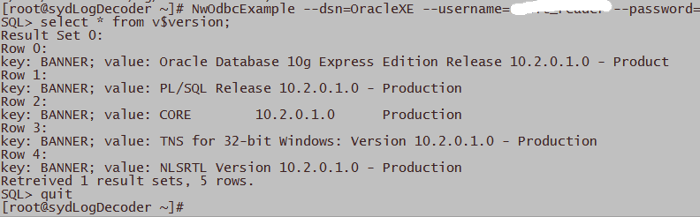
Product Details
RSA Product Set: RSA Security AnalyticsRSA Product/Service Type: RSA Security Analytics Log Collector
Summary
How to test an ODBC connection from a RSA Security Analytics Log Collector? How to get additional ODBC connection tracing from a Log Collector test connection?
Approval Reviewer Queue
ASOC Approval Group