.png?width=180&height=32&name=NW%20Logo%20(2).png)
Issue
When Custom dashboard was shared to another user. The user can not view delete, Settings, Share and Add row button as below. (highlighted with Red box)
Cause
This issue caused due to the user is not the original creator of the dashboard.Workaround
Below is the work around to get the Settings, Add row and Share buttons for shared dashboard.- Click on Copy button (highlighted in green) of shared dashboard.
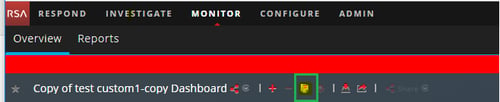
- This prompts to choose Dashboard Title.
- The copied dashboard will have Settings, Add row and Share buttons.
Note: Only Administrators (Creator of the dashboard) can share the dashboard with other roles. Other roles such as Analysts, Operators, and so on can share the dashboard with only similar roles.
Resolution
if the dashboard has been shared by any user (Creator of the dashboard), then other users can only perform below activities.- View dashboard
- Make dashboard as favorite
- Copy dashboard
- Export dashboard.
Only Original Creator of the dashboard can perform below additional activities.
- Removing dashboard
- Sharing to Others
- Adding Row
- Adjusting settings
Product Details
RSA Product Set: NetWitness Logs & NetworkRSA Product/Service Type: Security Analytics Server
RSA Version/Condition: 11.X
Platform: CentOS
O/S Version: 7
Summary
This document outlines the viable options for shared dashboards along with workaround to get Settings, Add row and Share buttons.
Approval Reviewer Queue
RSA NetWitness Suite Approval Queue