.png?width=180&height=32&name=NW%20Logo%20(2).png)
Issue
A list of steps and possible causes to document the process of handling log collection with endpoint agents
Tasks
- Show the troubleshooting process for NetWitness log collection and explain the process on agents
- Show a list of possible causes
- Show a list of remediations
Resolution
NetWitness Endpoint Log Collection Process
The process of log collection begins with agent packager configuration. In the log collection checkbox, once checked, the agent will begin gathering logs based on the settings here. These settings create a config file that is included with the agent packager when generating an agent installer. These config settings include the name of the file, the type of filters for log collection desired, and the log collector with its backup address, which may or may not be targeted to the Endpoint Log Hybrid, or a separate log collector on another device if preferred to the Endpoint Log Hybrid(such as if the endpoint server has more limited storage capacity).
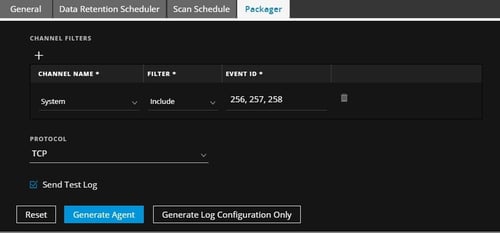
In the sample above it is specifying event id's seen in Windows to gather from the designated log type in Windows. Once the agent is installed, it will send the data directly to the designated log collector address assuming no errors are encountered by the agent. In some cases, the agent may continue processing if an error like a blank field is encountered, or it may stop further processing and not send any data.
Known Issues
Below is a list of known issues and their remediation versions or workarounds:
- Agent Log Collection has stopped on one or more endpoints entirely:
- Too many event id's:
- This occurs when more than 22 events exist in the event id section of the packager. If too many events are listed here, the packager will not send any logs. A workaround exists to resolve this by using range's instead of comma's, for instance instead of 1,2,3,4,5 for id's, use 1-5 instead as it will count each of these as 1 item instead of 5 when using range counts so long as the total is less than 22 entries in the event list. Fix version: 11.3.1.1
- Empty property fields:
- This occurs when an event has an empty property field when retrieved from Windows API. This caused logs to stop processing when it encountered this error. Another bug related to this caused any further events to cease to process after encountering this error. Fix Version: 11.3.0.0
- Misconfiguration:
- This occurs when incorrect values are entered into the packager, typically into the Channel Filters that the agent cannot process. When adding filters, ALL conditions must be met in order for the agent to collect logs for instance. The workaround would be to test with all events for a log type and see if a generic log collection works; if it does, then this is evidence of a mismatch with the filters used.
- Too many event id's:
Notes
There is a location that is useful on an endpoint system for reviewing the settings given by the agent, which is C:\ProgramData\<service_name>\<name_of_configuration>.nwelcfg this file aids in reviewing what kind of settings were given in the installer for the agent and can be reviewed on the endpoint system. This file should be gathered if a sample system is available.
Product Details
RSA Product Set: NetWitness Logs & NetworkRSA Product/Service Type: Endpoint Hybrid
RSA Version/Condition: 11.x
Platform: Windows
Summary
There are several issues related to NetWitness Endpoint log collection and a means to troubleshoot these issues should be in place
Approval Reviewer Queue
RSA NetWitness Suite Approval Queue