.png?width=180&height=32&name=NW%20Logo%20(2).png)
Troubleshooting Packet Drops (11.x and above)Troubleshooting Packet Drops
Packet drops can occur if there is backup happening at Packet Pool or Session Pool on the Decoder, and eventually, Decoder runs out of free capture pages resulting in drops.
Quick configuration Checks to avoid packet drops
The Decoder would log warning messages when it encounters packet drops. These logs contain possible reasons for drops, and you can solve some of the drop symptoms through simple configuration checks.
To check and tune the configuration:To check and tune the configuration:
In most cases, the decoder configuration parameters would be different from the default configuration or with the hardware deployed. So, make sure to check the following and fix configuration issues.
-
When /var/log/messages logs show drops with reason "check capture configuration, packet sizes".
-
NwDecoder[15913]: [Packet] [warning] Packet drops encountered, packet capture (737626/737628): check capture configuration, packet sizes and rates
-
For 10G decoder run
/decoder reconfig op=10g update=1
Or
Explore view | /decoder | properties | select reconfig | op=10g update=1 | send
-
For normal decoder run
/decoder reconfig update=1
Or
Explore view | /decoder | properties | select reconfig | update=1 | send
-
The Decoder service needs to be restarted for changes to be effective.
-
Monitor decoder for drops
-
-
When /var/log/messages logs show drops with reason "check packet database configuration, iostats, packet and content calls"
-
NwDecoder[74030]: [Packet] [warning] Packet drops encountered, packet write (717957/723314): check packet database configuration, iostats, packet and content calls
-
Packet drops encountered (884632/884642): check session & meta database configuration, iostats and sdk activity.
-
For 10G decoder run
-
/database reconfig op=10g update=1
Or
-
Explore view | /database | properties | select reconfig | op=10g update=1 | send
-
-
For normal decoder run
-
/database reconfig update=1
Or
-
Explore view | /database | properties | select reconfig | update=1 | send
-
-
The Decoder service needs to be restarted for changes to be effective.
-
If we are still seeing drops, then a few more changes are required. There could be i/o bound waits for database writes on the Decoder.
-
Set /database/config/packet.integrity.flush=normal
-
Set /database/config/session.integrity.flush=normal
-
Set /database/config/meta.integrity.flush=normal
-
-
Monitor decoder for drops.
-
-
As of NetWitness Platform latest version, sosreport retrieves service and database reconfig information as well as what settings were active when the sosreport was retrieved. This information can be used for cross-checking purposes and can be found in the ..../sos_commands/rsa_nw_rest directory (service-reconfig, database-reconfig, ls
).
Information required to troubleshoot packet drops
-
Monitor Packet Drops Tool Output (Highly recommended)
-
This can be accessed through REST port http://
:50104/sdk/app/packetdrops -
By default, the tool looks for drops in last 24 hrs and also provides options to search drops based on time ranges.
-
Enable detailed stats on decoder REST /decoder/parsers/config/detailed.stats=yes
What if the REST port is inaccessible?
-
Enable detailed stats on decoder
/decoder/parsers/config/detailed.stats=yes
-
Wait for new drops and then collect sosreport. The sosreport on Decoder would collect few stats db files.
-
These files can be copied to your local decoder /var/netwitness/decoder/statdb and restart Decoder.
-
Access packet drops tool on your local Decoder.
How do I troubleshoot packet drops?How do I troubleshoot packet drops?
The packet drops tool would help narrow down the possible cause for drops. There could be various cases involved that need verification.
The following sections describe how to use the Packet drops tool and analyze its results.
Navigate to the Packet drops tool using the REST interfaceNavigate to the Packet drops tool using the REST interface
-
The tool would search drop instances and list them with links.
-
Start investigating the latest drop instances where the drop count is high.
-
Look at other drop instances and find the pattern for drops.
Introduction to Drops tool ChartsIntroduction to Drops tool Charts
-
Incremental Packet Drops - Displays packet drops count at that instance of time
-
Capture - Displays traffic ingestion rates Capture.rate in Mbps and Calculated capture rate (instantaneous rate) in Mbps.
-
Packet Pool - Displays graphs for the following packet pool stats:
-
capture - /decoder/stats/pool.packet.capture → Number of free packet pages available for capture
-
assembler - /decoder/stats/pool.packet.assembler → Number of packet pages waiting to be assembled.
-
write - /decoder/stats/pool.packet.write → Number of packet pages waiting to be updated to Packet Database.
-
pool - /decoder/stats/assembler.packet.pages → Number of packet pages held in the assembler
-
export - /decoder/stats/pool.packet.export → Number of packet pages waiting to be exported
-
-
Session Pool
-
This displays graphs for following session pool stats
-
parse - /decoder/parsers/stats/pool.session.parse → Number sessions waiting to be parsed.
-
write - /decoder/stats/pool.session.write → Number of session pages waiting to be written.
-
correlate - /decoder/stats/pool.session.correlate → Number of session pages waiting to be correlated.
-
queue.sessions.total - /decoder/parsers/stats/queue.sessions.total → The total number sessions in parse threads and queues.
-
export - /decoder/stats/pool.session.export Number of session pages waiting to be exported.
When packet drops occur, the chart shows that instance of time in yellow.
Symptoms Checklist
We recommend following the symptom checks in the order listed below, and this helps to troubleshoot all the symptoms associated with current packet drops.
Symptom 1: Higher traffic ingestion rates for the content deployed would cause packet drops
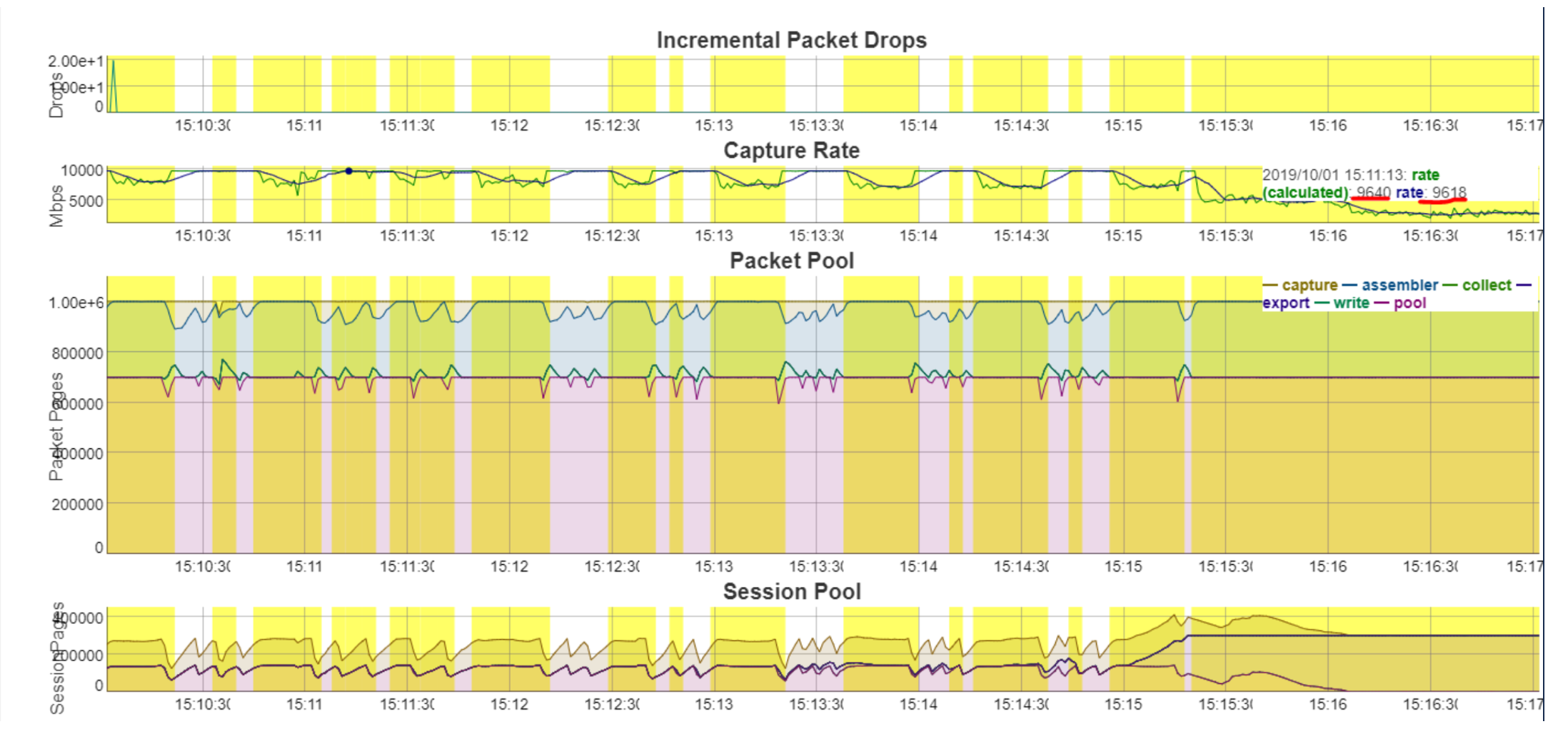
If the traffic ingestion rate -( capture ) > 8 Gbps for the content (higher number of parsers) deployed on Decoder, this would cause packet drops.
ex: Below screenshot shows capture rate > 8 Gbps (9.6 Gbps)
Resolution:
Consider the following options:
-
Split the traffic ingestion into multiple decoders so that the ingestion rate would be ~4-5 Gbps
Or
-
Start with baseline supported 10G content and then add parsers one by one until no drops are observed.
-
Refer Parsing and Content Considerations section on Configure High Speed Packet Capture Capability.
-
Symptom 2: Packet Database Write backup would cause packet drops
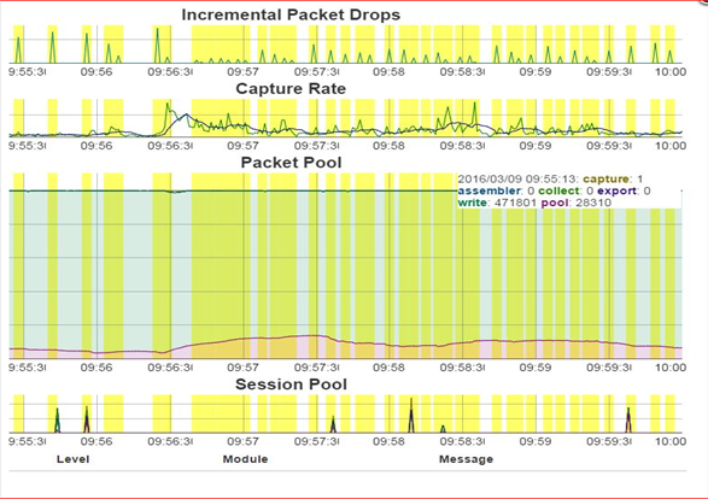
Packet Pool Write - write (pool.packet.write), if write backup increases, then packet write delays would be causing the drops
ex: Below screenshot displays, there are many packet pages (471K) waiting on the write queue.
-
Decoder logs would throw warnings like the below:
-
NwDecoder[74030]: [Packet] [warning] Packet drops encountered, packet write (717957/723314): check packet database configuration, iostats, packet and content calls
Top -Hp
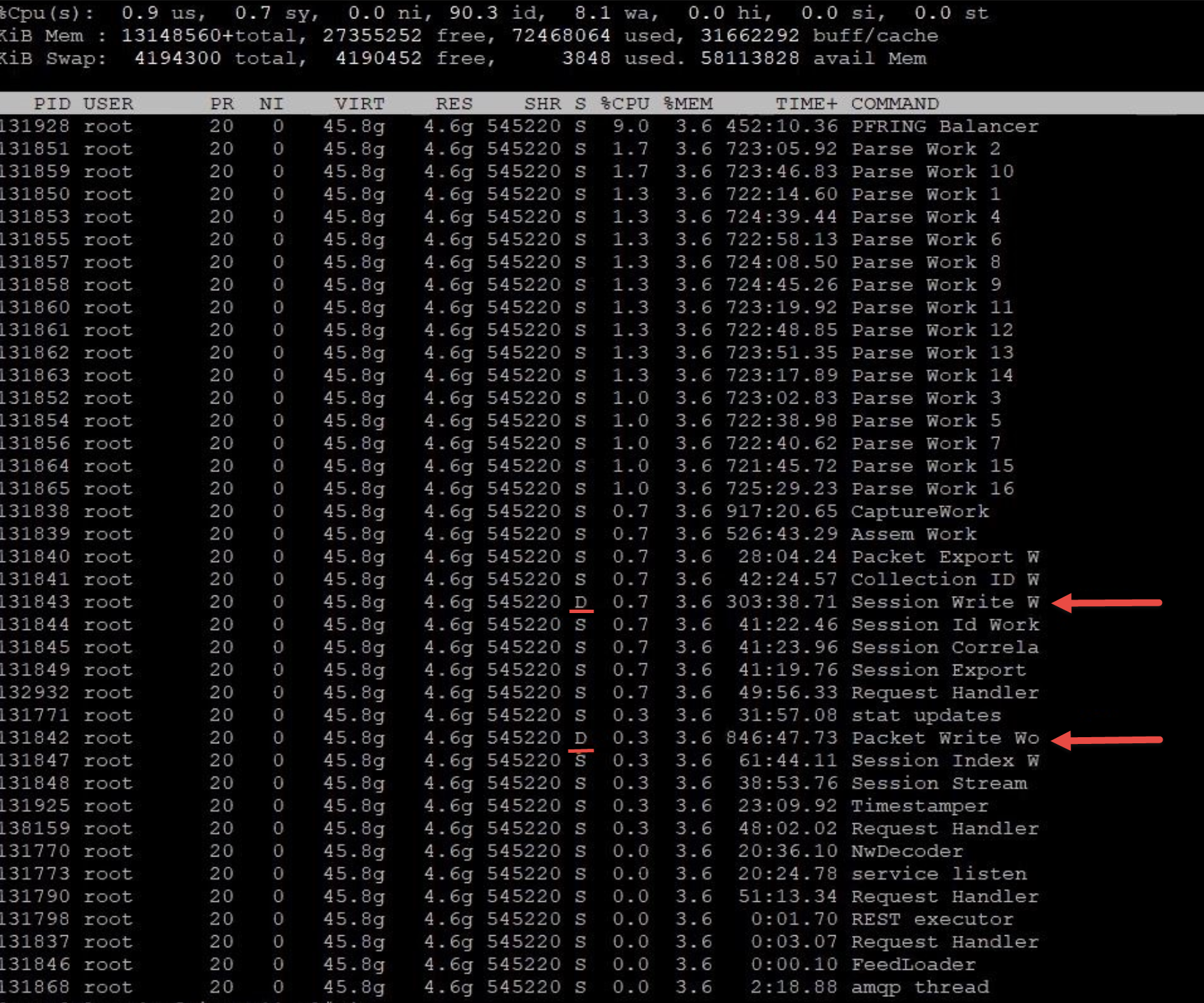
iotop tool can show Disk i/o activity: rpm is available here and can be installed: http://mirror.centos.org/centos/7/os/x86_64/Packages/iotop-0.6-4.el7.noarch.rpm
Example iotop results where decoder packet write thread is blocked on IO 99% of decoder IO time and its throughput is just ~400KB/s
iotop –o –d 2

Resolution:
-
Make sure database configuration tuning is applied as suggested in the section To check and tune the configuration:
-
Check I/O stats on the Decoder using the command "iostat –mNx 1". Refer to How do you get statistics on I/O performance?
-
If % iowait is > 10% then decoder packet db writes have higher i/o waits
-
If % util for packetdb goes greater than 95 and wMB/s < 1000 , then Disk write throughput is low and the Disk where packetdb exists needs to be replaced.
-
If iotop is installed the disk io activity can be monitored through 'iotop –o –d 2'
-
For a 10G decoder we recommend packet db disk write throughput to be 1300 MB/s (~10Gbps ) for better write performance.
-
-
Lot of Content calls to extract packets or content can cause packet write issue.
-
Check drops tool logs or /var/log/messages or sosreport logs for SDK-Content Calls.
-
You can also use NwConsole topQuery command on messages logs to identify Content calls.
-
Set /decoder/sdk/config/packet.read.throttle=100 ( a higher value ) so that packet write would get preference.
-
Check service invoking SDK-Content calls and reduce the content calls.
-
-
Kernel and Driver compatibility issues
-
Check if the firmware is updated according to Kernel version. If not update firmware.
-
How do you get statistics on I/O performance?How do you get statistics on I/O performance?
-
The command you want to run for near real time statistics on I/O usage is "iostat -N -x -m 1". For detailed information on the output of iostat, type "man iostat". If the columns do not line up, you can leave off the -N option, but you should probably run it once so you can see what disk groups correspond to which databases.