.png?width=180&height=32&name=NW%20Logo%20(2).png)
Troubleshoot ReportingTroubleshoot Reporting
This section provides troubleshooting instructions for issues faced when using the Reporting module in NetWitness.
Configuring SFTP Server Issue
Procedure
Try the following steps if you face any issues while configuring the Linux SFTP server:
-
If the Report Output Action for the configured SFTP fails, you must SSH to the SFTP server and try to connect locally to check if SFTP is working fine.
Connect to SFTP server:
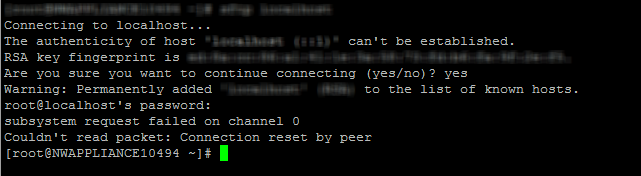
- If the Local connection fails, open the file sshd_config> vi /etc/ssh/sshd_config.
-
Check for the entry in the file:
# override default of no subsystems
Subsystem sftp /usr/libexec/openssh/sftp-server - If this entry does not exist, add the two lines mentioned in Step 3 at the bottom of the file and Save it.
- Restart service from SSH > service sshd restart.
- Retry the SFTP connection now.
- Make sure SFTP port is not blocked by SA server appliance firewall. Update iptables rules to allow sftp port.