.png?width=180&height=32&name=NW%20Logo%20(2).png)
Issue
Customer receives emails from the NetWitness Reporting Engine that contains invalid URLs within reports and alerts. These URLs point to locations that do not exist within NetWitness and no page is visible.
Cause
This issue is caused when there is no host name, or an incorrect host name is entered in the Reporting Engine configuration.
Resolution
To fix this issue perform the following steps.- Log into the NetWitness UI
- Go to Administration -> Services
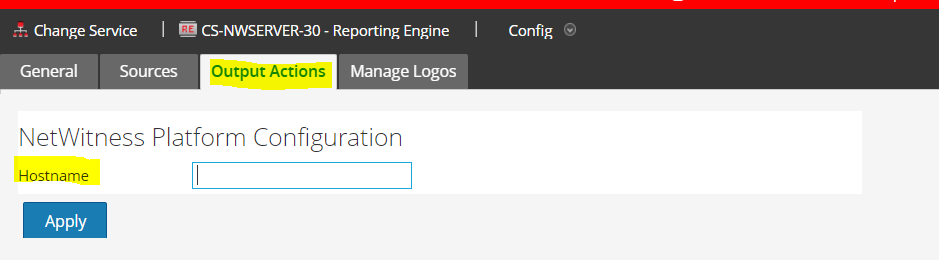
- Select the Reporting Engine and then select Config (View/Actions --> View)
- Under the Output Actions tab there is an option to enter the hostname of the NetWitness Server configuration.
- Please enter, the fully qualified host name or ip address of the NetWitness server. If using the fully qualified host name, make sure that the name is in DNS, otherwise, use the ip address.
- Re-trigger the item that sent the email and test the link.
Notes
The most common causes of this issue:- A host name was never entered.
- An incorrect host name was used.
Internal Comments
Product Details
NetWitness Product Set: NetWitness Logs and PacketsNetWitness Product/Service Type: Admin Server, Reporting engine
NetWitness Version/Condition: 11.x /12.X
Platform: CentOS 7 / Alma
Summary
Customer complains that when receiving emails from NetWitness that contain links to access Investigations, the URL points to a dead/non-existing link.
Approval Reviewer Queue
Technical approval queue