.png?width=180&height=32&name=NW%20Logo%20(2).png)
Issue
When a Virtual Log collector is rebooted, the VMware Remote Console hangs at "Provisoning Agent: Starting:" as shown below.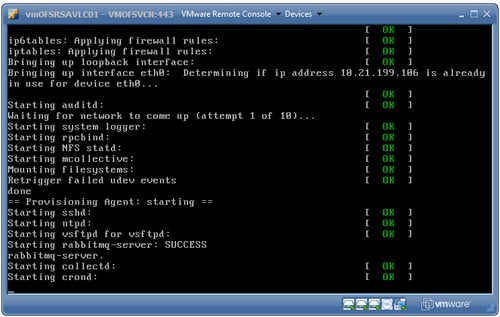
Cause
This condition does not affect the virtual machine functionality but the console hangs at this stage.This is due to a configuration issue, tty1 is not included in the range of active consoles in the /etc/sysconfig/init configuration file.
Resolution
Verify the active consoles parameter using the following command.grep ACTIVE /etc/sysconfig/init

Note that the output indicates the active consoles are 2 through 6 and console 1 is inadvertently omitted from the configuration.
Use these steps to correct the configuration.
- Select console 2 by pressing [Ctrl]+[Alt]+[F2].
- Edit the configuration file:
vi /etc/sysconfig/init
- Locate the line containing "ACTIVE_CONSOLES=/dev/tty[2-6]"
- Edit this line and change "tty[2-6]" to "tty[1-6]".
- Restart the appliance to implement the change.

Internal Comments
This impacts all virtual machines from 10.5 and also from 10.4.
Product Details
RSA Product Set: Security AnalyticsRSA Product/Service Type: All Security Analytics Virtual Appliances
RSA Version/Condition: 10.4.x, 10.5.x, 10.6.X
Platform: CentOS
O/S Version: 6
Summary
When certain versions of Security Analytics virtual machines are started or rebooted, the VMware Remote Console hangs at Provisioning Agent: Starting. This does not not affect the functionality of the virtual machine.
Approval Reviewer Queue
RSA NetWitness Suite Approval Queue