.png?width=180&height=32&name=NW%20Logo%20(2).png)
Issue
I need to find the Serial Number of my RSA Netwitness or RSA Security Analytics appliance.
Resolution
To retrieve the serial number of your appliance using the Security Analytics WebUI, please follow these steps- Login to the NetWitness or Security Analytics WebUI as Administrator.
- Navigate to the Administration | Services tab.
- Select the Service on an appliance you want to confirm the serial number. (You do this through the Services tab and not the Host tab which is counter-intuitive.)

- From the System tab, select the "Host Tasks" option.

- From the Task pick list select "Show Serial Number" and Click the 'Run' button.
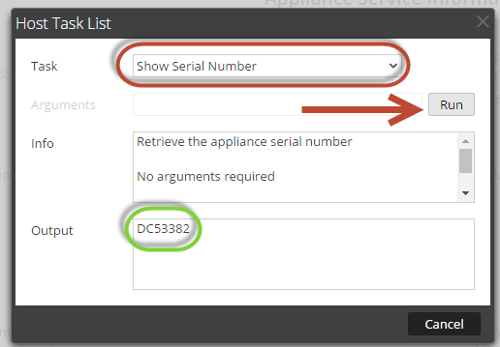
- The appliance serial number will be displayed in the "Output" window. Provide this serial number to Technical Support when initiating an RMA.
Notes
It is possible to lookup the serial number from the CLI using the following command as well:
[root@S5-PHYB-01 ~]# dmidecode -s system-serial-number
C55N776
C55N776
Internal Comments
This article updates and replaces KB 26710, which was also Primus Article a58575.
Product Details
RSA Product Set: Security AnalyticsRSA Product/Service Type: SA Security Analytics Server
RSA Version/Condition: 10.3.x, 10.4.x, 10.5.x, 10.6.x
Platform: CentOS
Summary
Use this article to find the Serial Number of an RSA NetWitness or RSA Security Analytics appliance through the WebUI or through the CLI via SSH.
Approval Reviewer Queue
RSA NetWitness Suite Approval Queue