.png?width=180&height=32&name=NW%20Logo%20(2).png)
Issue
I need to locate the SFTP Agent (RSA_nwsftagent4100b0020.exe or sasftpagent.sh) downloads for the RSA NetWitness Platform.
Resolution
The two agent downloads, along with the accompanying mvpersinfo.sh script, can be found at the following link: RSA NetWitness SFTP Agent DownloadsThe downloads can be found on any of the product downloads pages for the RSA NetWitness Platform versions. (e.g. RSA NetWitness Logs & Packets 11.2 Downloads, RSA Security Analytics 10.6.6 Downloads, etc.)
To access the downloads page for a specific version, simply navigate to the RSA NetWitness Platform page, hover over Downloads and then RSA NetWitness Logs & Network in the product menu, and then select the appropriate version. Alternatively, you can navigate to the downloads page for a version by clicking on the appropriate version in the right side bar under Product Versions or by clicking on the All Versions link and then clicking on the appropriate Downloads link from that page.

On the Downloads page, you will find the link to the SFTP Agent downloads underneath the Tools section, as shown below.
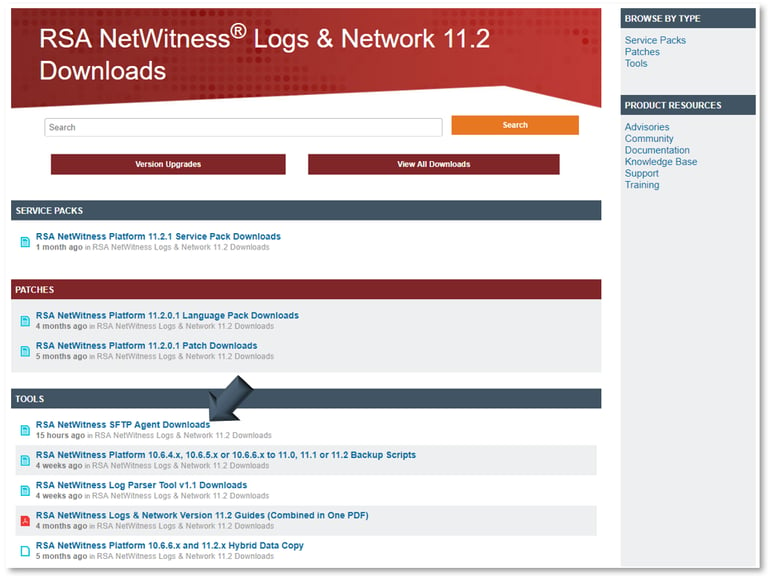
On the downloads page for the RSA NetWitness SFTP Agent you can click on the hyperlink for the file you wish to download (including the checksum files for each) and the download will be initiated.
You may be required to log in again if your session has timed out.

Notes
If you encounter an Unauthorized error message when accessing the Downloads pages then refer to the following article: Unauthorized error when attempting to access a product page or content on RSA LinkProduct Details
RSA Product Set: NetWitness Logs & Network, Security AnalyticsRSA Product/Service Type: SFTP Agent
RSA Version/Condition: 10.x, 11.x
Summary
Instructions for locating the SFTP Agent download for RSA NetWitness Logs & Packets on the RSA Link website.
Approval Reviewer Queue
Non-Product Approval Queue