.png?width=180&height=32&name=NW%20Logo%20(2).png)
Issue
Windows SNARE Agents Logs are not parsing properly and not able to view required meta.
Cause
Log fields are not separated with "," delimiter
Aug 29 09:45:19 jumphost.rsabr.lab.com MSWinEventLog 0 Security 7176 Mon Aug 29 09:45:18 2023 4689
Microsoft-Windows-Security-Auditing WORKGROUP\JUMPHOST$ N/A Success Audit jumphost.rsabr.lab.com Process Termination
A process has exited. Subject: Security ID: S-1-5-18 Account Name: JUMPHOST$ Account Domain: WORKGROUP Logon ID: 0x3E7
Process Information: Process ID: 0x9f8 Process Name: C:\Windows\System32\WindowsPowerShell\v1.0\powershell.exe Exit Status: 0x0 6943
Microsoft-Windows-Security-Auditing WORKGROUP\JUMPHOST$ N/A Success Audit jumphost.rsabr.lab.com Process Termination
A process has exited. Subject: Security ID: S-1-5-18 Account Name: JUMPHOST$ Account Domain: WORKGROUP Logon ID: 0x3E7
Process Information: Process ID: 0x9f8 Process Name: C:\Windows\System32\WindowsPowerShell\v1.0\powershell.exe Exit Status: 0x0 6943
Resolution
To resolve the issue, follow the steps below:- Move attached registry(SNAREdelimiter.reg) file to Event source.
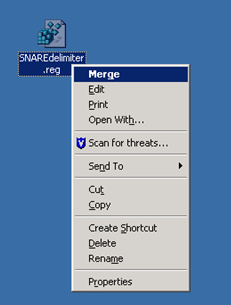
- Merge the registry file with Event source.
- Press Yes and Ok for the confirmation.


- Restart snare services in services.msc .
- Check the latest logs from Event source.

Product Details
RSA Product Set: NetWitnessRSA Product/Service Type: Security Analytics Server
RSA Version/Condition: 10.x 11.x 12.x
Platform (Other): Windows SNARE Agent
Approval Reviewer Queue
Technical approval queue