
Executive Summary
In a previous blog, we introduced and explored the Chaos C2 Framework but not the Remote Administration Tool (RAT). This research by the FirstWatch team delves into the RAT itself and its capabilities. As we noted previously, “Chaos RAT supports agents for Windows, Mac, and Linux, however, the feature availability does differ depending on the platform the agent is deployed on…” This research focuses on the Windows variant compiled in Go.
The name “Chaos” is also used for a ransomware family, a remote access trojan (RAT) and a Distributed Denial of Service (DDoS) malware. As a result, sorting through all the various “Chaos” malware samples to find those Chaos related to our current course of research was difficult.
As per the details provided on the GitHub repository by Tiago Rodrigo Lamper, a Brazilian programmer and owner of the repository for both Chaos RAT and its C2 Framework, this Chaos RAT enables users with the ability to perform a variety of tasks including the creation of malicious payloads, as well as the ability to establish and maintain control over compromised systems. Once Chaos RAT is downloaded and launched on victim system, it transmits detailed system metadata like hostname, username, IP and MAC address to a remote C2 server, while also coming with capabilities to carry out file operations (upload, download, delete), take screenshots, shutdown and restart the computer, and open arbitrary URLs.
A History of Chaos
In November 2022, Trend Micro found that The Chaos RAT was first incorporated by a cryptocurrency mining campaign which focused on involving Linux machines and specific cloud computing instances being targeted. Based on this campaign, where Chaos RAT was sighted, the operators of Chaos RAT strategically hosted their payloads across multiple locations, ensuring continuous and uninterrupted functionality.
Chaos RAT Features
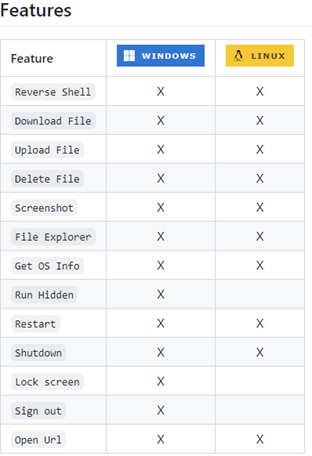
Figure 1: Features of the Chaos RAT for Windows and LINUX Operating Systems
Analysing Chaos RAT with NetWitness
Payloads and C2
The delivery method of the payload is up to the attacker and not dictated by the tool. To carry out this research, we have created a server and client environments to experiment with this RAT functionalities on Windows machine. We have generated multiple payloads to show that an attacker can generate executable multiple times. The list of example payloads is as follows:
| test_chaos.exe |
03a1757d6a6d3f231dfc91961d12c3826ff415f83b26322ac8dc640fb6b5045b |
| chaos_test2.exe |
310a3d7dced847f30d9c1bde77b9c9e37fbd6e40103ec5971a7c0d2de86aa6a6 |
| chaos_test3.exe |
d6ff402ec3892ba8413c6e7ba4e5e11ba0cbdd4dbc6710b627d7ae157906061e |
These examples represent payloads generated using Chaos RAT that were delivered to the Windows victim machine by FirstWatch team. Similarly, the FirstWatch team employed generic commands and generated sample files throughout the research to test and demonstrate the functionalities of the RAT.
Once the payload is delivered and executed on victim machine, the C2 connection gets established and shows how detailed actions that can be performed on victim machine to the attacker as shown in the below, Figure 2.
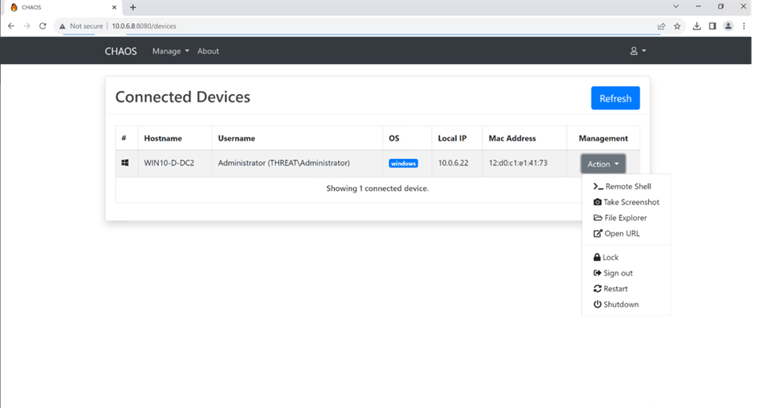
Figure 2: Detailed view of victim data on attacker machine
Once the RAT payload has been successfully deployed, executed and its respective capabilities have been proven effective against the victim host, we can see following reflected events under endpoint-concentrator on Investigate page.
C2 Network events are logged for outgoing traffic on NetWitness originating from the Chaos-generated executable source file. This happens once the connection is established between client and the server.
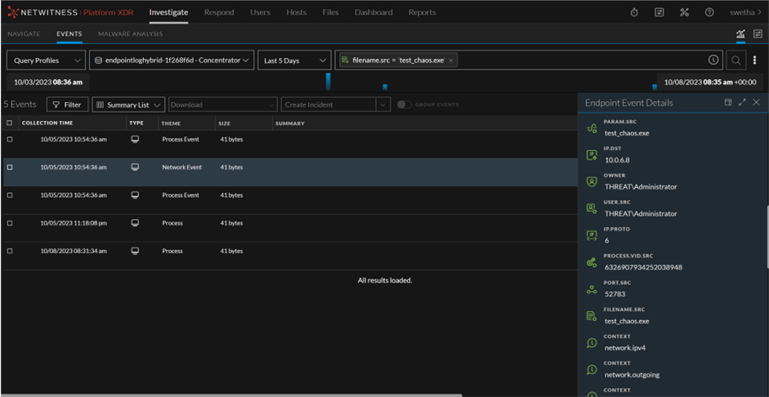
Figure 3: Outgoing connection to the Chaos server.
Observing the traffic initiated from an executable, as illustrated in the picture, is consistently preferable for enhanced monitoring. It can also aid in preventing an attack at its early stages from progressing further.
File Explorer
The attacker can access the file explorer and there by upload, download, delete and manipulate files on the victim machine which results in continuous access to victim machine and can download additional files for execution on the victim’s machine.
In the below Figure 4, z.ps1 is the file uploaded by attacker which reflected as writeToExecutable event on NetWitness. Similar scripts are intended to establish persistence which when originating from an unknown executable can be a good indicator of malicious behaviour.
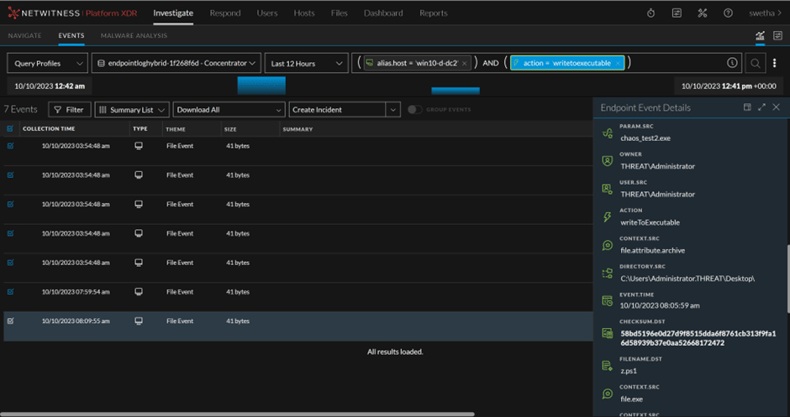
Figure 4: PowerShell file uploaded by attacker
Open URL
This functionality helps an attacker to remotely access any arbitrary URL on victim machine and download additional required data or an attacker may insert malicious scripts into websites trusted by the organization and frequently used on a daily basis to move laterally in the victim’s environment.
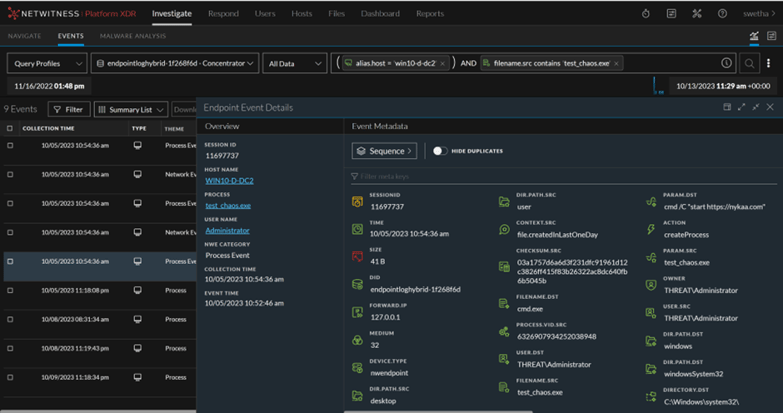
Figure 5 :Attacker opened an URL
In the above figure, a URL was launched through cmd.exe, initiated by an unfamiliar executable. This deviates from the typical process of opening a URL, where the meta param.src should typically reflect the executable of the web browser. This deviation can be regarded as a notable and potentially suspicious behaviour. This happens when attacker selected the action to open a URL and the createProcess event is generated by the Chaos executable on NetWitness.
Remote Shell
Remote Shell functionality helps an attacker to have a control over the machine using command line interpreter.
The commands populated under Target Parameter[param.dst] meta in the below Figure were executed using remote shell function.
The command "cat z.ps1" below indicates that the attacker attempted to view the previously uploaded script using the command prompt, initiated from an unidentified executable. This activity raises suspicions due to its unconventional behaviour.
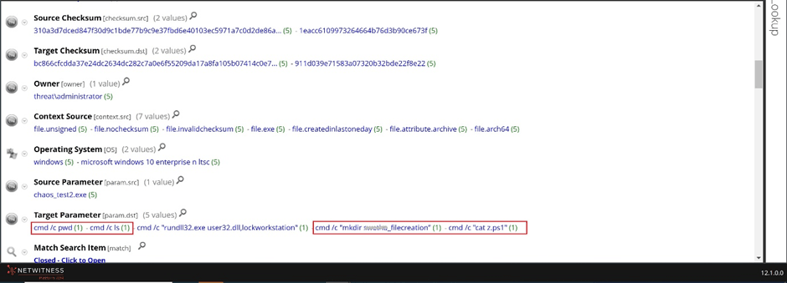
Figure 6: Remote shell commands
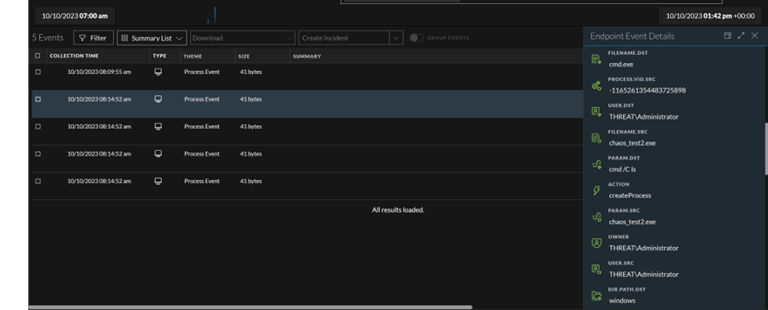
Figure 7: Remote shell commands
The attacker can execute the commands as illustrated in the above figure, leading to a potential escalation of privileges and further advancements within the victim's environment. Likewise, various commands can be applied, including registry changes, policy modifications and more.
Screenshot
Upon the attacker clicking on the screenshot action, an image capturing the live state of the victim machine is downloaded to the attacker's system. This enables the adversary to gather any necessary data using these screenshots.
Detecting this step proves challenging for the agent, as the file is transmitted to the attacker without leaving any traces on the victim's machine.
In the below figure, we can see the LIVE state of victim machine gets downloaded to the attacker's machine where Chaos Server is hosted. This capability enables attackers to obtain real-time information about the current state of the victim's machine and may also result in the leakage of sensitive data.
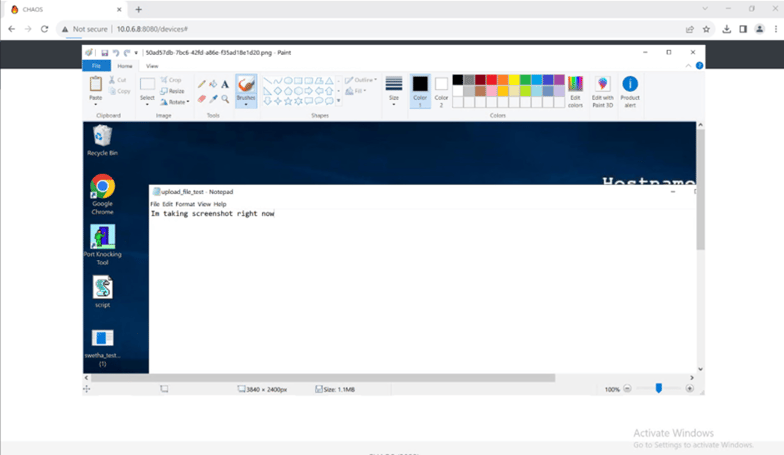
Figure 8: Screen capture of victim machine on attacker machine
Lock
The attacker can easily lock the victim’s machine, this action is performed using suspicious rundll32 command to lock the workstation through command line. Though the practice of using user32.dll,LockWorkStation for workstation locking is prevalent, it cannot be combined with rundll32.exe. The presence of both simultaneously can be considered as good indicator of compromise. This behaviour is observed in other attack scenarios as well.
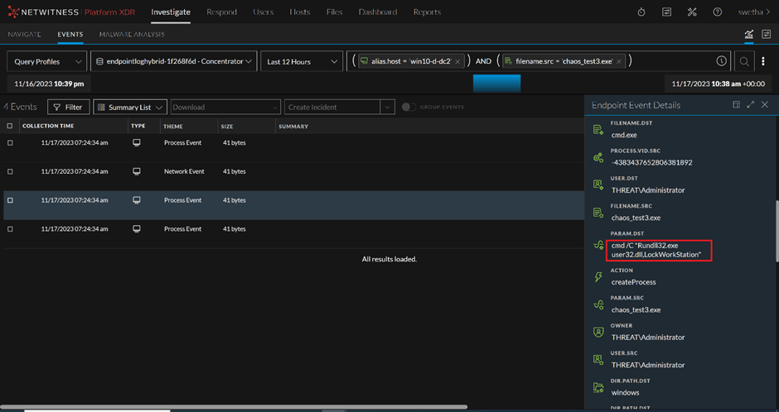
Figure 9: Anomalous usage of locking workstation.
Sign Out
When the attacker clicks on "Sign Out," this action triggers a logoff of the current session, closing any associated applications. As indicated in the figure below, payload issued the command to log off the current session. The attacker may have made necessary changes through preceding actions and subsequently signed out.
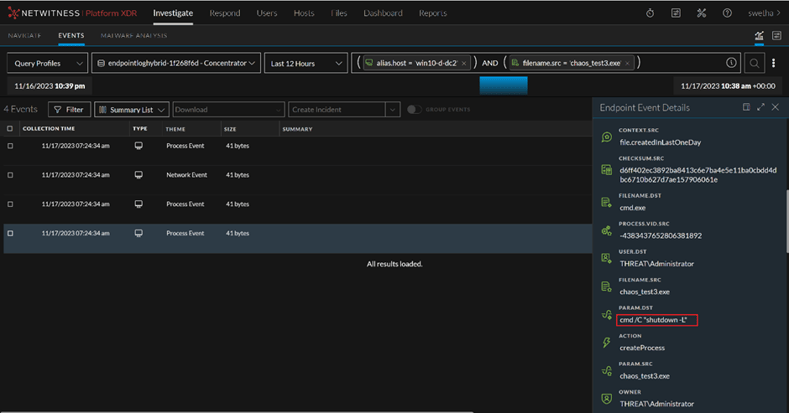
Figure 10 : Usage of command to sign out of victim machine
Restart and Shutdown
Selecting these capabilities by an attacker result in the victim machine being powered off and leaving no traces of commands or behaviour to detect unlike other functionalities. We can say attacker has successfully accomplished their nefarious activities and disconnected from the victim machine. Although, the attacker can still reconnect again as the payload remains active.
MITRE ATT&CK Information:
Resource Development
- Develop Capabilities: Malware (T1587.001) – Adversaries develop custom malware for their operations.
Execution
- Command and Scripting Interpreter(T1059) – Running commands on the command-line interface remotely.
Defense Evasion
- System Binary Proxy Execution: Rundll32(T1218.011) - Used rundll32.exe to lock the workstation.
Command and Control
- Ingress Tool Transfer(T1105) - Can download additional files for execution either from attacker machine or from web-based services on the victim’s machine.
Collection
- Screen Capture(T1113) - It has the ability to capture screenshots of compromised hosts.
Impact
- System Shutdown/Reboot(T1529) - Commands used to initiate a shutdown/reboot of a victim’s machine remotely.
Stay tuned for rules, and other threat intelligence logic that will be made available via NetWitness LIVE!
Conclusion:
In this blog, FirstWatch analyzed and identified malicious activities of Chaos RAT from the viewpoint of the RSA NetWitness. Also covered each step of it and found out how NetWitness helps in identifying key signatures and Co-relating the events discussed can be used to avoid an attack.
Given the actions described above that were carried out by the RAT, it is essential to utilize a platform capable of detecting anomalous behaviour. This proactive measure is crucial for preventing successful attacks from taking place.
References:
https://github.com/AndroVirus/CHAOS-RAT
https://www.hack4.net/2017/07/chaos-framework-generate-payloads-and.html
https://www.trendmicro.com/en_in/research/22/l/linux-cryptomining-enhanced-via-chaos-rat-.html
https://en.anonyviet.com/chaos-rat-software-for-remote-computers-easily/