While creating the Windows Log Policy, you can configure Channel Filter Settings and select the channels from which the Windows XML EventLogs (EVTX) and Windows Event Logs are collected. NetWitness Platform XDR allows you to add or remove a channel filter and select default channels. The Channel Filter allows you to type in any valid channel name. The events from such channel is captured as and when the new event is generated.
Note: For more information on creating the Windows Log Policy, see https://community.netwitness.com/s/article/CreateGroupsandPolicies.
To configure Channel Filter Settings as part of Windows Log Policy creation:
Important: The following steps can be performed only after performing the Sub step 5 under Step 6 in the Create a Windows Log Policy topic.
- Do one of the following in the Channel Filter Settings section under Selected Settings Panel ((Admin) > Endpoint Sources > Policies > Define Policy > Selected Settings).
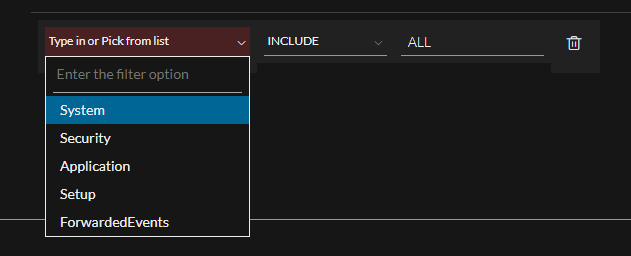
i. Select any of the following default channels from the drop-down list:
System
Security
Application
Setup
ForwardedEvents
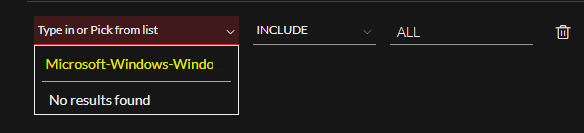
ii. Type in any valid channel name in Enter the filter option (and press enter) and save the policy.
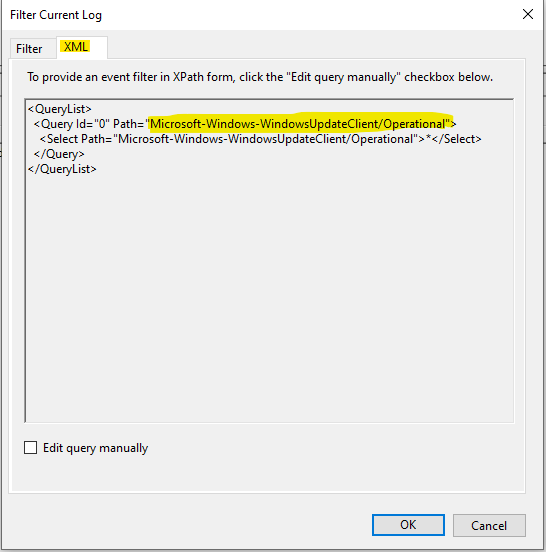
For Example: If you want to add a custom channel Microsoft-Windows-WindowsUpdateClient/Operational, you can type in the same in Enter the filter option and save the policy.
- Select any of the following in the Filter drop-down:
Include: This option allows agents to capture logs from the selected channel.
Exclude: This option disallows agents to capture logs from the selected channel.
- Enter a valid Event ID.
For Example: ALL.
Once the Endpoint agent receives the updated policy, a test log is sent with the status of the added filter.
Note: You must enable the SEND TEST LOG option to view the test log.
The Status and the Message parameter in the following screenshot indicates if the given channel name is valid.
%MSWIN-AgentTest-1: Agent=NWE AgentIP=10.125.245.12 AgentComputer=DriWin7SP1x64 AgentTime=2022-11-16T10:36:59.9606479Z ServerList=udp://10.125.244.249; Filter="
" Enabled=True Status=Success Message="The filter was loaded successfully."If the channel name is invalid and the agent cannot apply the policy, Status=Failure is displayed in the test log, and a relevant error message is displayed in the Message parameter.
To obtain a proper channel name:
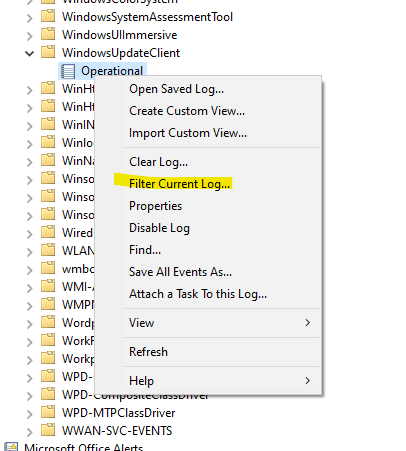
- Open Event Viewer in your windows machine.
- Go to the channel from which you want to capture the events.
- Right-click and select Filter Current Log….
- Go to the XML tab. Copy the name displayed in the Path and add it in the policy for creating the custom policy.