
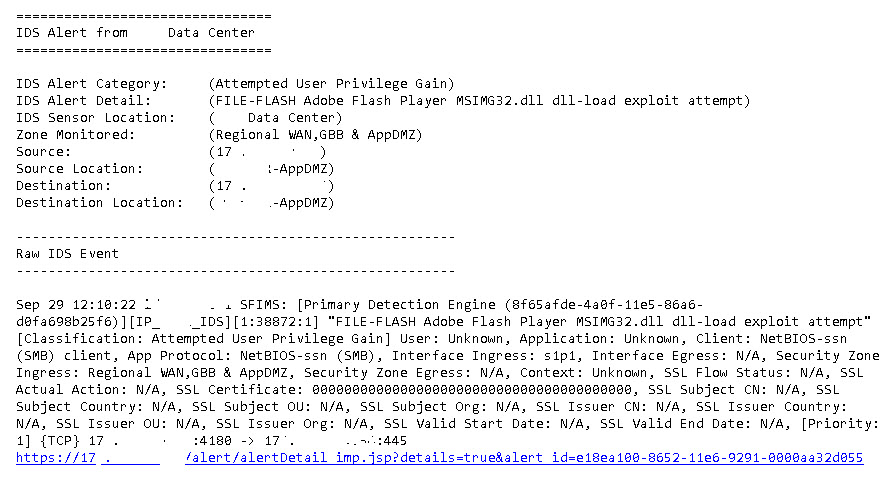
A customer requested to recreate specifically formatted email alert templates that they were getting from Trustwave. I put together the following script with the help of the following 2 solutions. :
Report for ESA's Triggered Alerts with Raw Events (Halim)
https://inside.emc.com/docs/DOC-134577
000031690 - How to send customized subjects in an RSA Security Analytics ESA alert email
https://community.rsa.com/docs/DOC-45491
Here is the final script:
- In the Security Analytics Web Interface, navigate to Administration -> System -> Global Notification -> Output.
- Create a New ESA Script Containing the text below.
#!/usr/bin/env python
from smtplib import SMTP
import datetime
import json
import sys
import re #regular expressions
import urllib2 #for querying concentrator's API
import logging #for sending syslog
import logging.handlers #for sending syslog
import time
import io
def dispatch(alert):
"""
The default dispatch just prints the 'last' alert to /tmp/esa_alert.json. Alert details
are available in the Python hash passed to this method e.g. alert['id'], alert['severity'],
alert['module_name'], alert['events'][0], etc.
These can be used to implement the external integration required.
"""
with open("/tmp/esa_alert.json", mode='w') as alert_file:
alert_file.write(json.dumps(alert, indent=True))
#function to get the raw logs from the sessions IDs
def getrawlogs():
f = open('/tmp/esasyslogtest.log','w') #open and clear the file, start fresh
f.write('')
#f = open('/tmp/esasyslogtest.log','w') write the raw log to the message we're building
for line in open("/tmp/esa_alert.json"): #open the file containing meta related to the triggered alert
if "sessionid" in line: #look for the each line containing sessions IDs of constituent events
sid = re.search('(\d+)',line) #only keep the actual session ID (numbers) and drop all text
rawlog = querycon(sid.group()) #call function to query the concentrator which returns the raw log for the session ID
rawlog = rawlog.replace("\n", "") #do some cleaning
f.write(rawlog)
f.close()
#function that returns the raw log message based on the session ID by querying the concentrator's API
def querycon(sid):
cip = '1.2.3.4' #concentrator's IP
rport = '50105' #rest port
userData = "Basic " + ("saservice:netwitness").encode("base64").rstrip() #first encode the username & password
req = urllib2.Request('http://'+cip+':'+rport+'/sdk/packets?render=logs&sessions='+sid) #we build the query
req.add_header('Authorization', userData) #add the authentication header
raw = urllib2.urlopen(req) #make the request
return raw.read() #return the raw log
def read():
#Parameter
sa_server = '1.2.3.5'
brokerid = '35'
smtp_server = 'smtp.world.so'
smtp_port = '25'
smtp_user = ''
smtp_pass = ''
from_addr = "LogAll <LogAll@so.com>"
to_addr = ['sal.sa@so.com']
# Get data from JSON
esa_alert = json.loads(open('/tmp/esa_alert.json').read())
#Extract Variables (Add as required)
try:
module_name = esa_alert["module_name"]
except KeyError:
module_name = "null"
try:
sig_type = esa_alert["events"][0]["sig_type"]
except KeyError:
sig_type = "null"
try:
event_desc = esa_alert["events"][0]["event_desc"]
except KeyError:
event_desc = "null"
try:
sensor = esa_alert["events"][0]["sensor"]
except KeyError:
sensor = "null"
try:
ip_src = esa_alert["events"][0]["ip_src"]
except KeyError:
ip_src = "null"
try:
ip_dst = esa_alert["events"][0]["ip_dst"]
except KeyError:
ip_dst = "null"
# Sends Email
smtp = SMTP()
smtp.set_debuglevel(0)
smtp.connect(smtp_server,smtp_port)
#smtp.login(smtp_user,smtp_pass)
raw_event = ''
with io.open('/tmp/esasyslogtest.log') as f:
try:
raw_event = ''.join(f.readlines())
except IOError:
pass
date = datetime.datetime.now().strftime( "%d/%m/%Y %H:%M" )
subj = ( module_name ) + " :: " + ( date ) + " :: " + ( sig_type ) + " :: " + ( ip_src )
message_text = ("Alert Name: \t\t%s\n" % ( module_name )+
"Date/Time: \t\t\t%s\n" % ( date ) +
"IDS Signature: \t\t%s\n" % ( sig_type ) +
"IDS Alert Detail: \t%s\n" % ( event_desc ) +
"Sensor: \t\t\t%s\n" % ( sensor ) +
"Source IP: \t\t\t%s\n" % ( ip_src ) +
"Target IP: \t\t\t%s\n" % ( ip_dst ) +
"\n" +
"Raw Event: " + "\n" +
"\n" +
raw_event
)
msg = "From: %s\nTo: %s\nSubject: %s\nDate: %s\n\n%s\n" % ( from_addr, to_addr, subj, date, message_text )
smtp.sendmail(from_addr, to_addr, msg)
smtp.quit()
if __name__ == "__main__":
dispatch(json.loads(sys.argv[1]))
getrawlogs() #add the raw logs of the constituent events to the message
time.sleep(1)
read()
sys.exit(0)- Note: The indentation in the above message is very important.
- Change the line sa_server = to reflect the IP address of your SA Server.
- Change the line brokerid = '35' to reflect the deviceid of your SA Broker.
- Change the line smtp_server = to be the IP address of your SMTP server.
- Change the from_addr and to_addr lines as applicable to your environment.
- Go to the Global Notifications -> Servers tab and define a Script Server (accept the default values).
- Under Alerts ->Configure make sure that the rule for which you wish to use the script has the notification type set as Script ,as shown below. (Adjust Output Suppression as desired)

Email alert from trustwave
Email alert from ESA
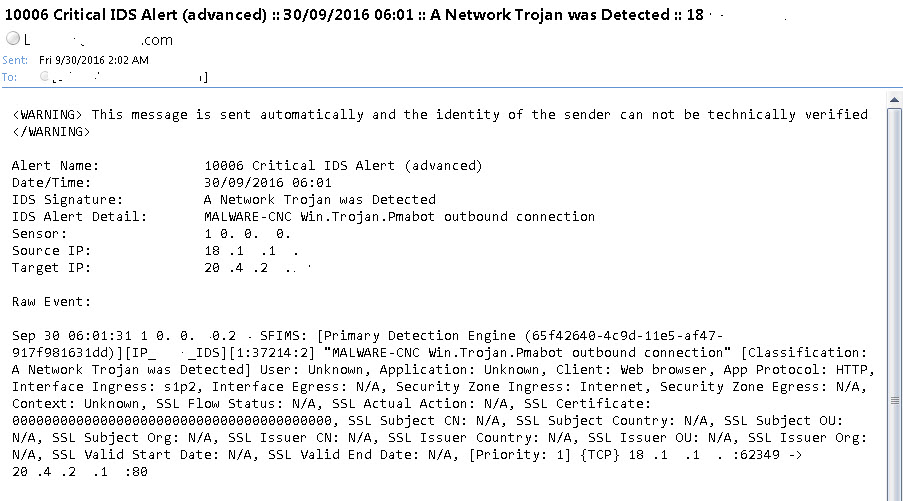
Looks pretty close. Just need a little formatting.
Let me know what you think. Good, Bad or Indifferent! You can't offend me it's all plagiarized!
RSA NetWitness Logs and Packets Training" data-type="space
NetWitness Logs and Packets Administrator" data-type="space