
Instant Indicators of Compromise (IIOC)s are a feature within the NetWitness Endpoint (NWE) platform that looks for defined behavioral traits such as processes execution, memory anomalies, and network activity. By default, NWE is packaged with hundreds of built-in IIOCs that are helpful for identifying malware and hunting for malicious activity. The topic of this article is relevant because new attacker techniques are constantly being discovered which can potentially be accounted for through the development of new IIOCs. In addition, individual organizations can devise active defense measures specific to their environment for the purpose of identifying potentially anomalous behavior through IIOC customization. Before diving into the details of developing IIOCs let’s review NWE documentation on the subject.
Warning: The database, in which IIOCs are dependent on, is subject to incur changes with each version of NWE which may affect custom created IIOCs. Contents within this article are based off the current version of NWE: 4.4.0.9.
The user guide provides a plethora of useful information on the subject of IIOCs and this article assumes that the reader has a baseline knowledge of attributes such as IIOC level, type, and persistent IIOCs. However, specifically regarding the creation and editing of IIOCs, there is limited information that is documented. Figure 1 is an excerpt from the NWE manual providing steps for IIOC creation.
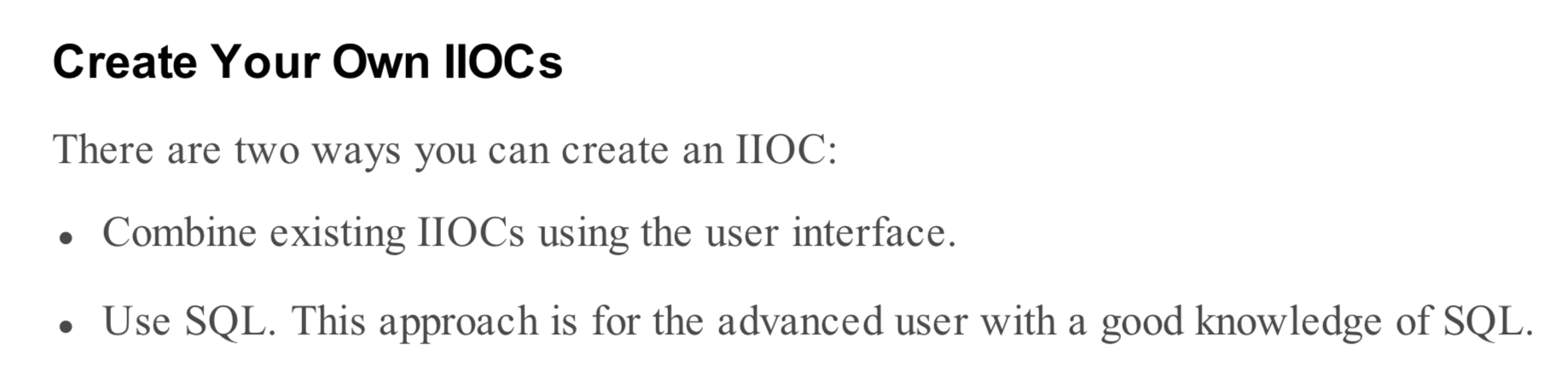
Figure 1: Excerpt from NWE User Guide
Reviewing and modifying existing IIOC queries will often times allow users to achieve the desired behavior. It is also a great way to enhance the user’s understanding of important database tables, which will be covered more in the query section. However, there is much more that can be said on the topic of IIOC creation. Expounding on these recommendations, as well as the entire “Edit and Create IIOC” section in the user guide, building a new IIOC can be broken down into three major steps.
IIOC Creation Steps:
- Create a new IIOC entry
- Develop the SQL Query
- Validate IIOC for Errors
Create IIOC Entry
Before we delve into the specifics of IIOC queries, let's begin with the basics. A new IIOC can be created in the IIOC window either by clicking the "New" button in the InstantIOC sub-window or by right-clicking on a specific entry in the IIOC table and then choosing the clone option. Both of these options are circled in red in Figure 2. As the name suggests, cloning an IIOC entry will copy over most of the attributes of the designated item such as the level, type, and query. In both cases, the user must click save in the InstantIOC sub-window for any changes to remain.
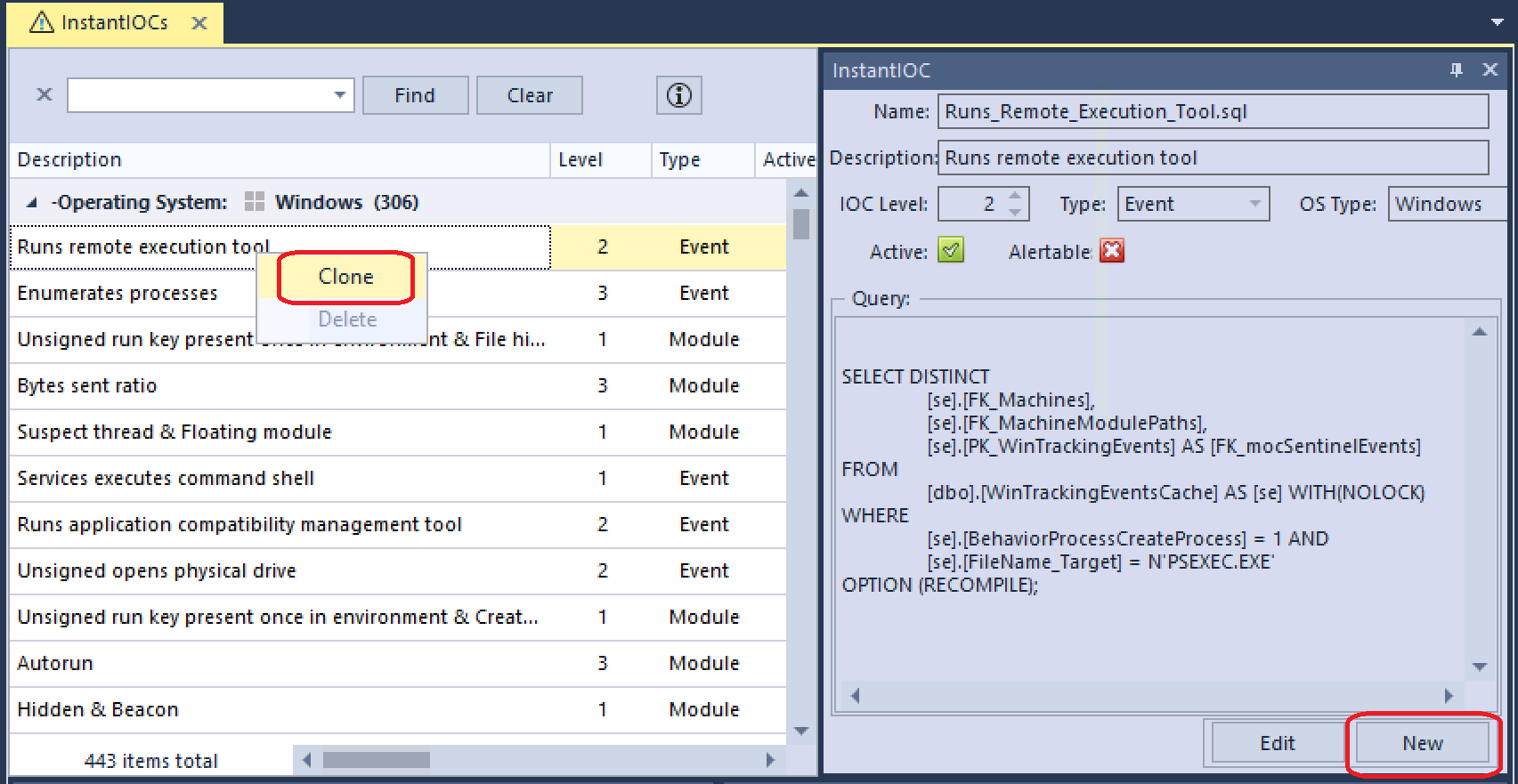
Figure 2: IIOC Entry Creation Options
When creating a new IIOC make sure that the Active checkbox is not marked until the entry has been finalized. This will prevent the placeholder from executing on the server until the corresponding query has been tested and verified. The IIOC level assigned to a new entry should reflect both its severity as well as the query fidelity. For example, a query that is prone to a high number of false positives would be better suited as a higher level in order to avoid inflated IIOC scores.
There are four unique IIOC types that can be chosen from in the Type drop-down menu: Machine, Module, Event, and Network. The distinction between these types will be further elaborated on in the next section. Also, be aware that IIOCs are platform specific, so the user must ensure that the correct operating system is chosen for the specified IIOC. Changing the OS platform can be done by modifying the ‘OS Type’ field and will cause the IIOC to appear in its matching platform table.

Figure 3: IIOC Platform Tables
At this point, it is also notable that all user-defined IIOCs will automatically be given a non-persistent attribute. This means that any modules or machines associated with the matching conditions of the IIOC will only remain associated as long as the corresponding values that matched are in the database. Non-persistent behavior is potentially problematic for event tracking and scan data, which utilizes ephemeral datasets. In order to bypass this potential pitfall, the persistent field can be updated for the targeted IIOC as seen in the SQL query below.

Figure 4: Update IIOC Persistent Field
Develop Query
Once a placeholder entry for an IIOC has been created, it can then be altered to achieve the desired behavior by modifying the query. IIOCs are built primarily through the use of SQL select statements. If the reader does not have a fundamental knowledge of the SQL language then a review of SQL tutorials such as W3Schools[1] is recommended.
More complex IIOCs can make use of additional SQL features such as temporary tables, unions, nested queries, aggregator functions, etc. However, a basic IIOC select query can be broken down to three major components: fields, tables, and conditions.
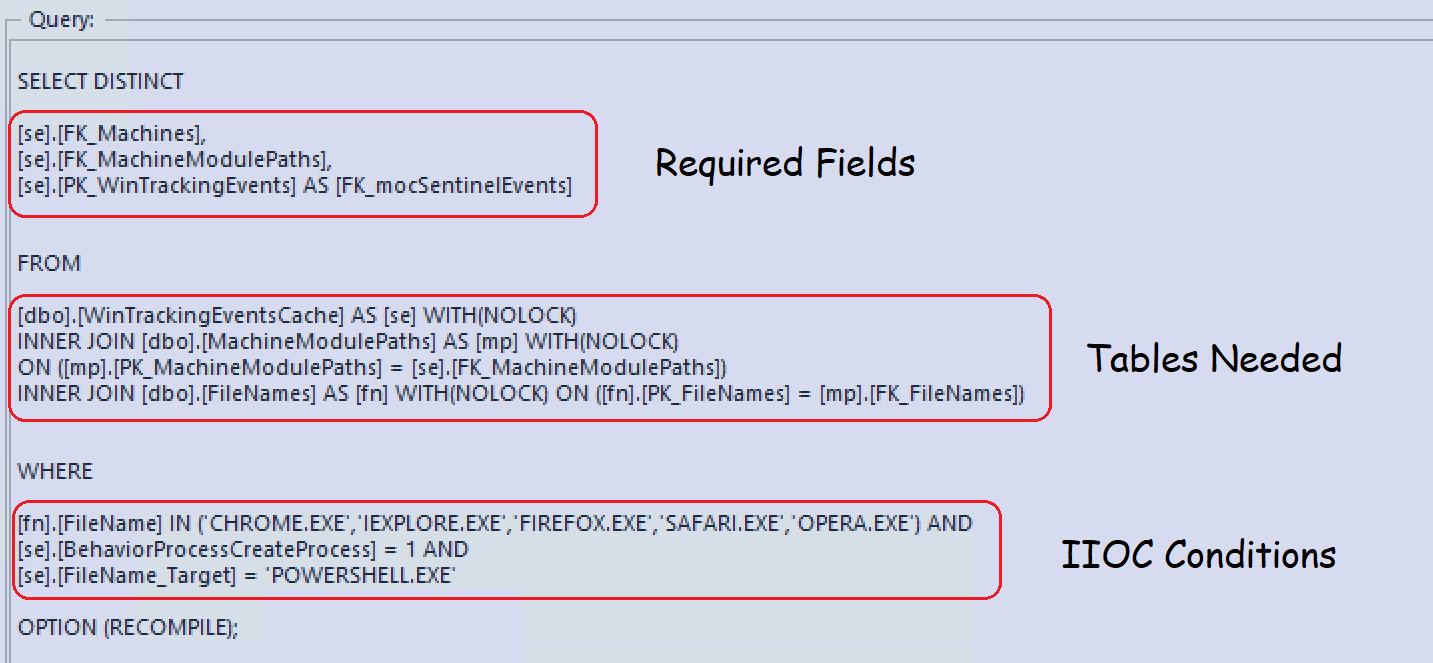
Figure 5: Query Sections
Database Tool
In order to develop and test queries for IIOCs, it is highly advantageous for the user to have access to database administrative software. An example of such a tool is SQL Management Studio, which can be installed alongside the Microsoft SQL Server instance on the NWE server. There are many alternative options to choose from such as heidiSQL and DBeaver, if the user wishes to connect from a client system or a non-Windows machine. These tools can also be used to provide further visibility into the database structure and to perform direct database queries for analysis purposes.
Required Fields
As shown in Figure 5, IIOCs require specific fields or columns, to be selected in order to properly reference the required data in the interface. Depending on the IIOC type chosen, these fields will slightly vary, but there will always be one or more primary keys needed from tables such as machines and machinemodulepaths. Unlike the other types, machine IIOCs only require the primary key of the ‘machines’ table. Nevertheless, the NWE server still expects two returned values. In these instances, a null value can be used as the second selected field.
Furthermore, the operating system platform will affect the keys that are selected in the IIOCs. Linux does not currently support event or network tracking, and the associated tables do not exist in the NWE database. Selected keys are expected to be in the order shown in Table 1 per entry from top to bottom.
Type |
Windows |
OSX |
Linux |
Module |
PK_Machines PK_MachineModulePaths |
PK_Machines PK_MacMachineModulePaths |
Machines PK_LinuxMachineModulePaths |
Event |
PK_Machines PK_MachineModulePaths PK_WinTrackingEvents |
PK_Machines PK_MacMachineModulePaths PK_mocMacNetAddresses |
N/A |
Network |
PK_Machines PK_MachineModulePaths PK_mocNetAddresses |
PK_Machines PK_MacMachineModulePaths PK_mocMacNetAddresses |
N/A |
Machine |
PK_Machines NULL |
PK_Machine NULL |
PK_Machine NULL |
Table 1: Required Fields by Platform
Keys selected can be either the primary keys shown in the table above or their associated foreign keys. Premade IIOC queries typically alias any selection of primary keys (PK_*) to match the prefix used for foreign keys (FK_*). However, this selection was probably chosen for consistency and does not affect the results of the query.
Tables Needed
Moving on to the next section of the IIOC query, we will need to determine which tables are selected or joined. As shown in the previous section, there are required keys based on the IIOC type. Therefore, the selected tables for a valid IIOC query must reference these keys. The tables that are needed will also be dependent on the fields that are utilized for the IIOC conditions, which will be covered in the next section. While there are hundreds of tables in the NWE database, knowledge of a few of them will help to facilitate basic IIOC development.
Since the NWE database currently utilizes a relational database, many important attributes of various objects such as filenames, launch arguments, paths, etc. are stored within different tables. A SQL join is required when queries utilize fields from multiple tables. In most cases when joining a foreign key to a primary key, an “inner join” can be used. However, if the IIOC writer must join tables on a different data point, then an alternative join type should be considered. A similar approach should be taken for any foreign keys that do not have the “Not Null” property.

Figure 6: Tables Used in IIOC Query
As with the selected keys in the Required Fields section, in many cases, there are separate tables based on the platform being queried. In these instances, the table name will be similar to its Windows counterpart with a special prefix denoting the platform. For example, the MachineModulePaths table that contains module information on a machine specific basis is called MacMachineModulePaths for OSX and LinuxMachineModulePaths for Linux. Table 2 contains the table names in the NWE database that are most useful while creating IIOCs. Most of these tables are platform specific, however, a few correspond to all operating systems. The next section will provide additional context for some of the Windows tables and their associated fields.
Windows |
MachineModulePaths |
mocAutoruns |
mocDrivers |
mocImageHooks |
mocKernelHooks |
mocLoadedFiles |
mocNetAddresses |
mocProcessDlls |
|
mocProcesses |
mocServices |
mocThreads |
mocWindowsHooks |
|
mocWindowsTasks |
WinTrackingEvents_P0 |
WinTrackingEvents_P1 |
WinTrackingEventsCache |
|
Mac |
MacMachineModulePaths |
mocMacAutoruns |
mocMacDaemons |
mocMacKexts |
mocMacLoginItems |
mocMacNetAddresses |
mocMacProcessDlls |
mocMacProcesses |
|
mocMacTasks |
mocMacTrackingEvents |
|||
Linux |
LinuxMachineModulePaths |
mocLinuxAutoruns |
mocLinuxCrons |
mocLinuxDrivers |
mocLinuxProcessDlls |
mocLinuxProcesses |
mocLinuxServices |
mocLinuxSystemdServices |
|
mocLinuxBashHistory |
||||
ALL |
FileNames |
Paths |
LaunchArguments |
Machines |
Domains |