
If you happen to have F5 LTM providing balancing or HA in front of your VLC for syslog messages then you may have enabled a monitor on the LTM to check for the VLC syslog service being reachable.
To do that you might have followed this guide to enable a UDP monitor that also requires an ICMP check to verify if the UDP 514 port is reachable.
Notice the default string in this example is "default send string"
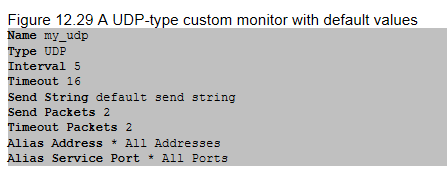
These health checks are not valid syslog messages and have no priority flag set (and are 0 payload length). At volume these messages cause problems with RabbitMq and should be dropped at the VLC to prevent as much of the noise getting to the decoders as possible,
To filter the messages you can use the Filter option available on the VLC under the syslog collection and implement it for both UDP and TCP syslog.
On the log decoders you can grep /var/log/messages to find these 0 length messages and the VLC that they came from to filter.
If you run tcpdump on the VLC looking for UDP or TCP messages from the 0 length sources you might see this (if the Monitor is configured with defaults). Notice the default.send.string value which correlates to the default F5 LTM config.
Now we need to define a filter for syslog to filter these messages from the syslog pipeline
VLC > Config > Event Sources > Syslog > Filter
Define a new Filter and then define a new rule