
In December of 2021, Intezer discovered a novel multi-platform malware[i]. Dubbed SysJoker, this backdoor written in C++ has the ability to infect Windows, Linux, and MacOS systems. In analyzed attacks, all 3 versions of the malware were seen to have similar capabilities such as registry modification, remote command execution, and the pulling/execution of second-stage malware.
This blog post will give a brief overview of each SysJoker variant and, using a Windows malware sample, will show how NetWitness EDR can help identify this backdoor in your environment.
A Look at the Variants
Windows:
The Windows version of SysJoker begins with a first stage DLL dropper. Using Powershell, the dropper DLL pulls a zipped SysJoker payload from an attacker-controlled domain. During execution of the malware, SysJoker will:
- Sleep for random intervals and at different times during its execution process to avoid detection (MITRE Technique: T1497.003 - Time Based Evasion).
- Copy itself to masquerade as the legit Intel Common User Interface file igfxCUIService.exe (T1036.005 - Match Legitimate Name or Location).
- Run successive Powershell commands to gather various pieces of system information including current username (T1087.001 - Local Account), IP and MAC address (T1016 - System Network Configuration Discovery), and host Operating System (T1082 - System Information Discovery). All gathered information is added to a temporary text file, encrypted, and saved as a DLL file for exfiltration (T1074.001 - Local Data Staging).
- Add itself to the Windows Run-on-startup Registry key HKEY_CURRENT_USER\Software\Microsoft\Windows\CurrentVersion\Run (T1547.001 - Registry Run Keys / Startup Folder).
Once communication has been established with its C2 server (retrieved from XOR-encoded hardcoded link), SysJoker will ping the C2 server to receive its instructions. The malware can perform four actions[ii]:
- cmd - Can run most Command Prompt commands on Victim system
- exe - Can drop and execute executables on infected host
- remove_reg and exit - Unseen in attacks; however, it is believed these are responsible for self-deletion of the malware
Linux:
The Linux version of SysJoker shares several of the same characteristics as the Windows variant. Once on a Linux system, the malware still sleeps in random intervals, retrieves a plethora of system information, and masquerades as a legit system file. The first distinction from its Windows counterpart is the method of achieving persistence. Instead of modifying the Run key registry for persistence, the Linux version creates a cron job to execute the malicious payload disguised as a system update. The titles of the payloads tend to follow a generic naming convention, with “update” being seen in analyzed attacks (ex: /home/$username/.Library/SystemServices/updateSystem). This version can also kill processes and/or remove any files with the same name as the designated system update file before placing a copy of itself on the victim machine.
MacOS:
The MacOS version of SysJoker is almost identical to the Linux variant, with the only key difference being how it establishes persistence on the infected host. This version creates a MacOS launch agent named “Apple launch service” (T1543.001 - Launch Agent, which in turn targets a generically named fake update file (ex: /Library/MacOsServices/updateMacOs) for repeated execution upon system start-up.
SysJoker Analysis with Netwitness EDR
Using our NetWitness Threat Lab, I executed a SysJoker sample, 1ffd6559d21470c40dcf9236da51e5823d7ad58c93502279871c3fe7718c901c.exe[iii], on a Windows 10 VM host. After double-clicking the file from the system desktop, it rested for approximately 60 seconds before acting. Shortly after the rest period, the malware used Powershell to copy itself to C:\ProgramData\SystemData\igfxCUIService.exe.
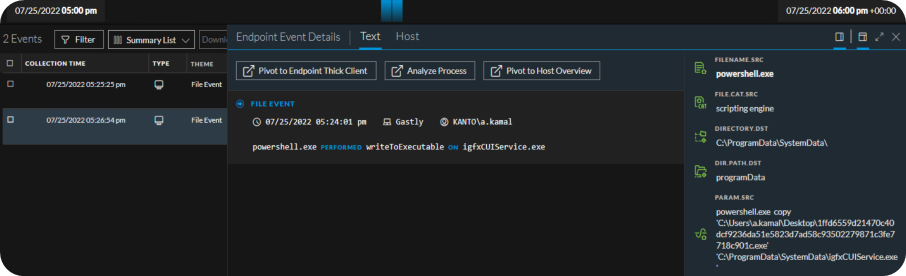
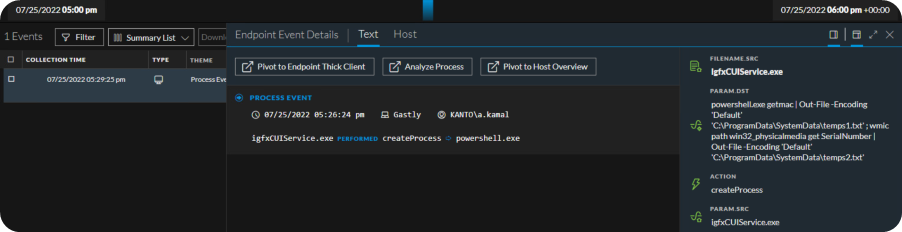
Masquerading as igfxCUIService.exe, SysJoker began gathering the desired system information. First it grabbed the system MAC address (‘getmac’) and Serial number (‘get SerialNumber’). The output for each was saved to two separate text files, temps1.txt and temps2.txt.
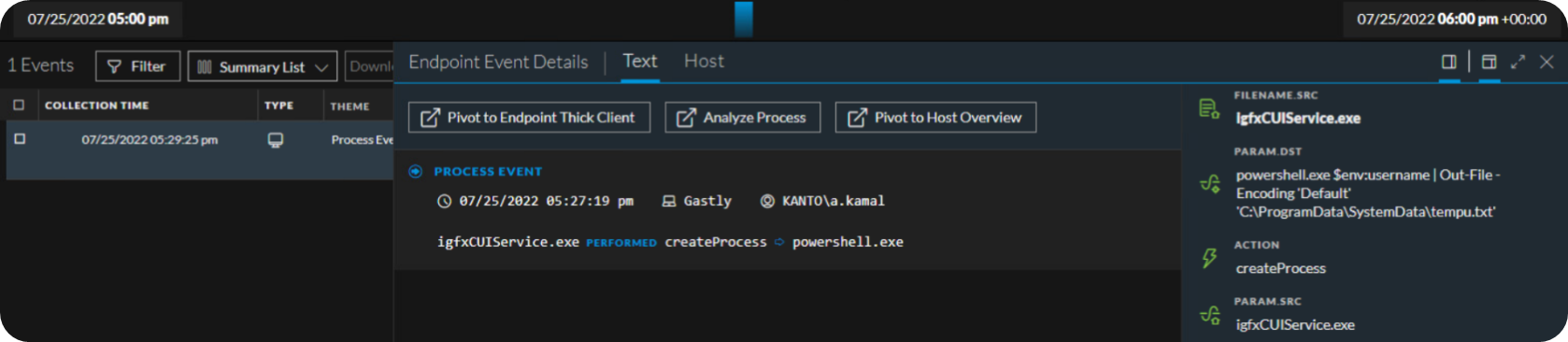
Next, the username for the currently logged on user was queried via Powershell. The results of this command are saved to a new text file, tempu.txt.
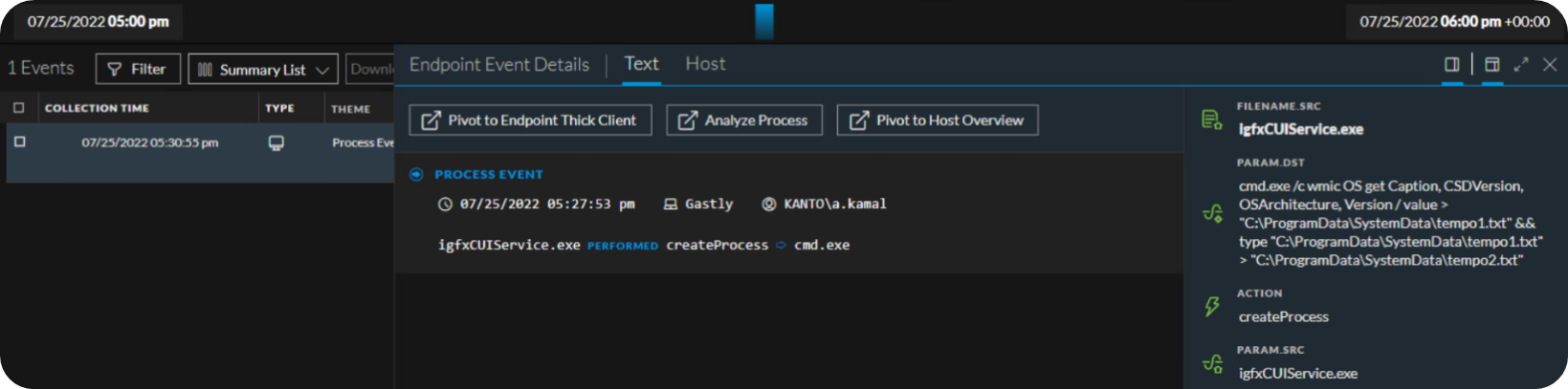
As expected, the malware then uses Command Prompt (cmd.exe) to query the Windows Management Instrumentation CLI (wmic.exe) for details on the OS. The OS info is then added to another text document tempo1.txt and duplicated to tempo2.txt.
The final item gathered by our SysJoker sample was the system IP address. Once again, cmd.exe grabs this by querying wmic.exe. Output is saved to a different text file, tempi1.txt and copied to tempi2.txt.
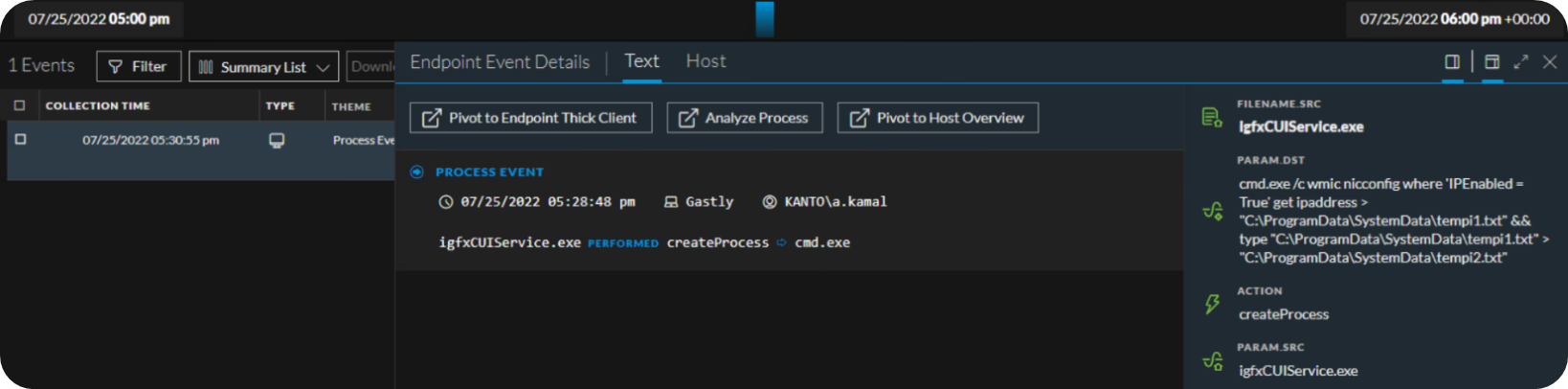
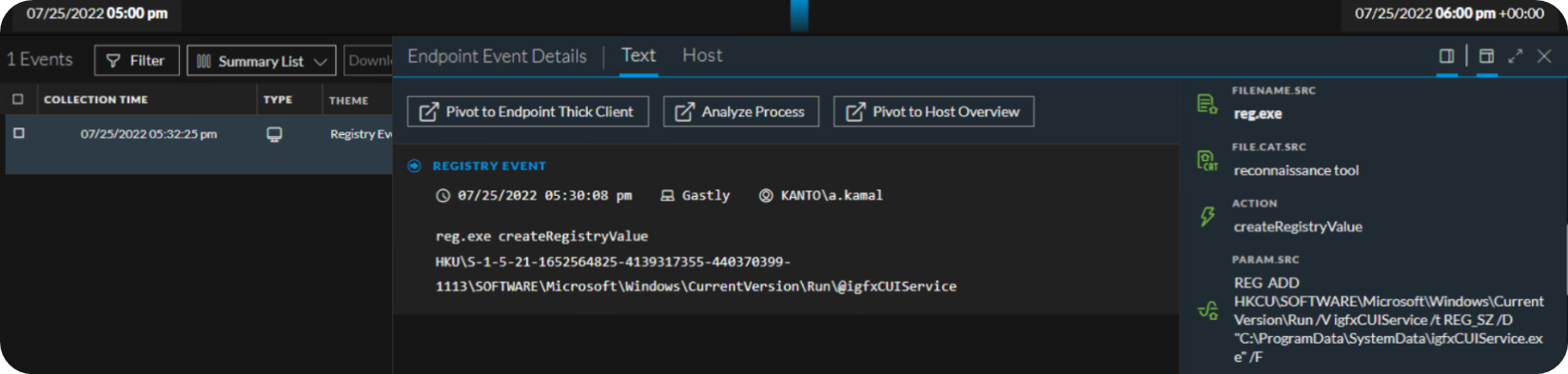
The last action observed in our Threat Lab NetWitness stack was the Run registry key modification for persistence. Our SysJoker sample added the masquerading file igfxCUIService.exe to HKCU\SOFTWARE\Microsoft\Windows\CurrentVersion\Run. This will ensure that the malware runs every time a user logs on.
NetWitness Detections for SysJoker
To assist cyber defenders with catching SysJoker in their Windows environments, we have created the following Application Rules:
-
Sysjoker Masquerades as Legit Service
-
Sysjoker - Get System Hardware Info
-
Sysjoker - Get Current Username
-
Sysjoker - Get System Software Info
-
Sysjoker - Get System IP Address
-
Sysjoker Modifies Registry for Persistence
All of these rules are currently available on NetWitness Live. We will continue to research both the Linux and MacOS variants and will provide updates on any developments or new content.
References
[i] https://www.intezer.com/blog/incident-response/new-backdoor-sysjoker/
[ii] https://blogs.vmware.com/security/2022/03/%e2%80%afsysjoker-an-analysis-of-a-multi-os-rat.html
[iii] https://bazaar.abuse.ch/browse.php?search=tag%3Asysjoker