External Group Mapping Tab
If you set up external user authentication, you can map NetWitness user roles to an external group. The External Group Mapping tab provides information about each external group to which you have mapped roles.
Workflow
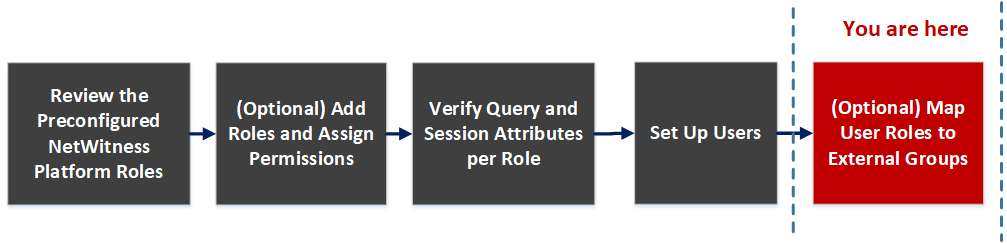
What do you want to do?
- Role: Admin
- I want to ...: Map a role to an external group
- Show me how: (Optional) Map User Roles to External Groups
- Role: Admin
- I want to ...: Search for an external group
- Show me how: Search for External Groups
Related Topics
Quick Look
To access this view, go to
(Admin) > Security and click the External Group Mapping tab.
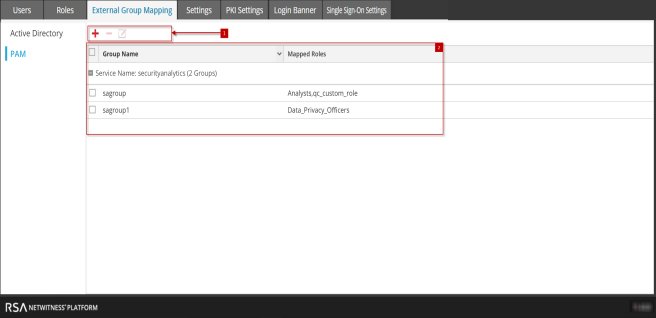
The External Group Mapping includes the following sections.
- Column 1: 1
- Column 2: Toolbar
- Column 1: 2
- Column 2: List
Toolbar
The following table describes the External Group Mapping toolbar.
- Icon:

- Description: Displays the Add Role Mapping dialog in which you can select an external group and map it to a NetWitness role.
- Icon:

- Description: Displays a warning message and asks for confirmation to remove all NetWitness roles mapped to the external group.
- Icon:

- Description: Displays the Edit Role Mapping dialog in which you can add or remove NetWitness roles from the external group.
List
The following table describes the External Group Mapping list.
- Feature: Group type
- Description: In the column on the left, click either Active Directory or PAM or SSO to show groups for the selected type.
- Feature: Selection box
- Description: In a row, toggles selection of a group name. In the title bar, toggles selection of all group names.
- Feature: Group Name
- Description: Displays the name of the external group that has access to NetWitness.
- Feature: Mapped Roles
- Description: Displays the NetWitness roles mapped to the external group.