Skip to content
  • There are no suggestions because the search field is empty.

Admin Security View

Admin Security View

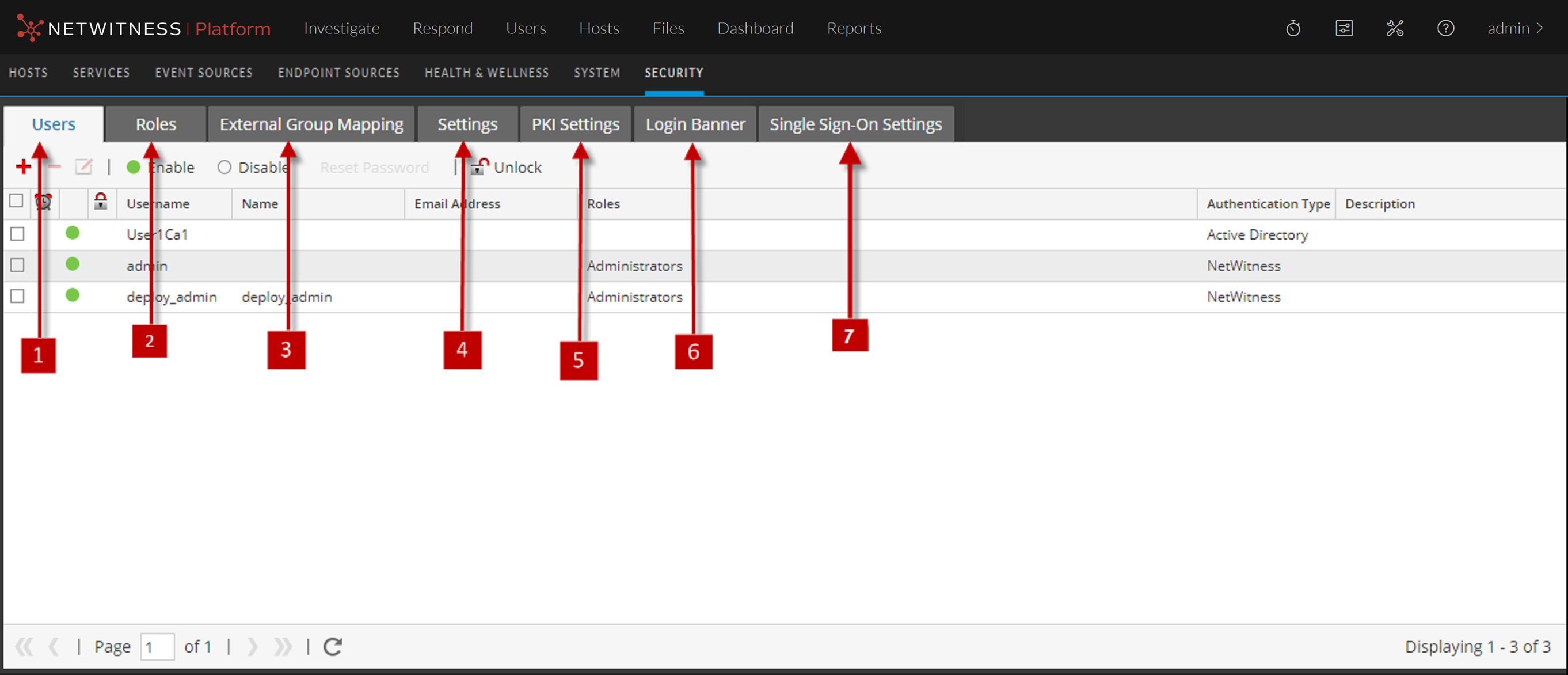
The Admin Security view provides the capability to manage user accounts, manage user roles, map external groups to NetWitness roles, and modify other security-related system parameters. These apply to the NetWitness system and are used in conjunction with the security settings for individual services.

What do you want to do?

  • Role: Admin
  • I want to ...: Manage users
  • Show me how:

    Set Up Users


Related Topics

Quick Look

To display the Admin Security view, go to netwitness_adminicon_25x22.png (Admin) > Security.

122_SecAdminView1_1122.png

  • Column 1: 1
  • Column 2: Users tab allows you to manage user accounts.

  • Column 1: 2
  • Column 2: Roles tab allows you to define security roles and assign roles to user accounts.

  • Column 1: 3
  • Column 2: External Group Mapping tab allows you to manage access parameters for LDAP groups.

  • Column 1: 4
  • Column 2: Settings tab allows you to configure password complexity and expiration for internal NetWitness users and to configure system behavior due to failed logins and inactivity. It also allows you to configure external authentication.

  • Column 1: 5
  • Column 2: PKI Settings allows you to enable and disable the PKI authentication.

  • Column 1: 6
  • Column 2: Login Banner tab allows you to set conditions which must be agreed to before gaining access to the login screen.

  • Column 1: 7
  • Column 2: Single Sign-On Settings tab allows you to enable and disable the SSO authentication.